

Lucid
Senior Member
close
Sep 16, 2025
- Join DateMar 2004
- LocationSan Antonio, Tx
- Posts:813
- iTrader Positive Feedback100
- iTrader Feedback Score(4)
- Car86 Camaro Z28/ 87 Camaro IROC Z28
- Engine5.0L TPI LB9 / 5.0 TPI LB9 w/cam
- TransmissionBuilt 700R4 with Transgo shift kit
- Axle/Gears3.27 9 bolt Posi/ 2.73 10 bolt Posi
- Likes:1
- Liked:1 Time in 1 Post
https://www.thirdgen.org/forums/diy-...scellanea.html
For more info:
Now, how do I get the display value to show up correctly in data logging session?
There is a field that says factor and one that says offset, the values that are default there I assume are incorrect because they are a conversion for a CTS sensor.
So the equation Volts = N/51
Assuming a base equation of ([X*Factor]+Offset])
and N=X
Volts = ([N*1/51]+ 0)
So if you Multiply by X * 1/51 and add a 0 offset, is this the correct translation?
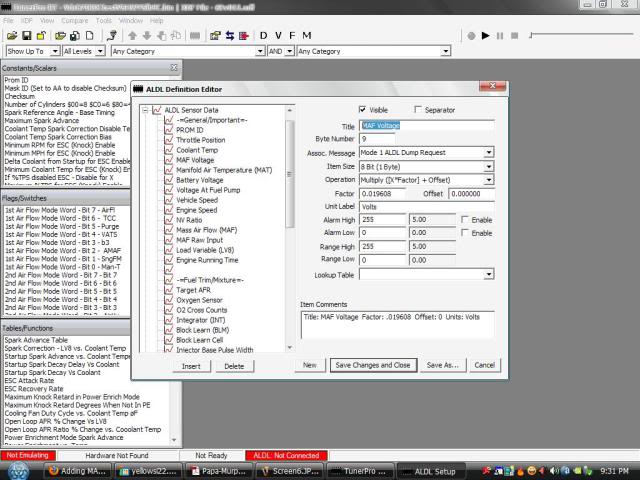
Essentially, changing the Factor to .019608 and setting the Offset to 0.00?
Quote:
Change them to the shown values and save the work (Action->Commit Changes). Then save the BIN.
Then change the .ADS file so that TP-RT shows byte 9 as the MAF voltage.
RBob.
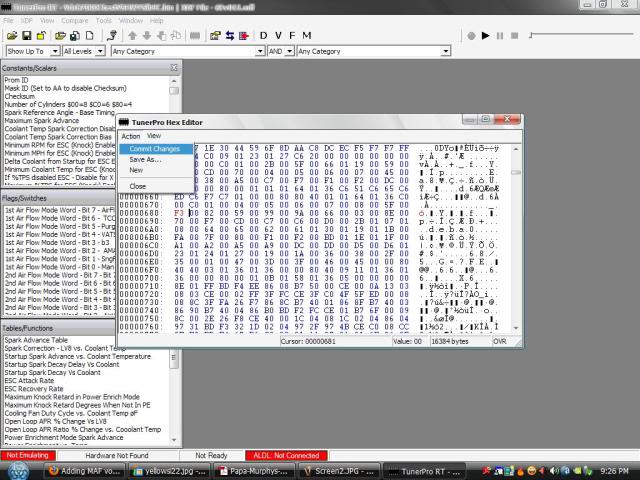
So I went into Tunerpro and changed $00 $60 to $00 $F3 at location $67F (startup coolant temperature). We are talking about using a $6E XDF and I am using a modified ARAP code to work on an LB9. Originally Posted by RBob
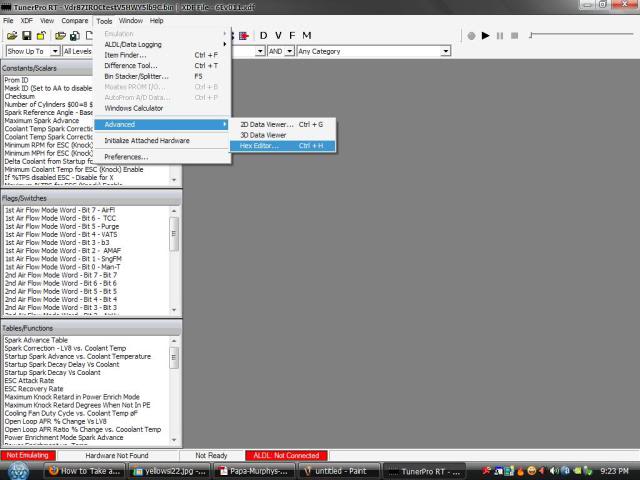
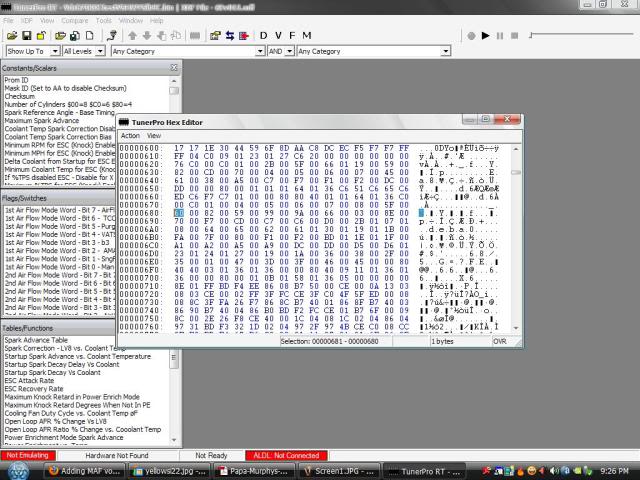
The location within the ALDL stream that needs to be changed may not be in the TP XDF file. Since this is a one time change using the Hex Editor works (Tools->Advanced->Hex Editor). Then go to location $67F and you will see the $00 $60 as the two bytes at that and the next address.Change them to the shown values and save the work (Action->Commit Changes). Then save the BIN.
Then change the .ADS file so that TP-RT shows byte 9 as the MAF voltage.
RBob.
For more info:
Quote:
Pick a location that isn't very helpful, such as the startup coolant temperature. Then edit the calibration by placing the address $00 $F3 there.
This is byte 9 of the stream, and is at address $67F. Currently it is $00 $60, change that to the above value $00 $F3
Save the BIN and use it in the ECM.
Second step is to modify what ever data logging program you are using. Byte 9 of the data stream will now be the MAF voltage. However, it needs to be converted differently then the start up CTS.
So change the data-logging/display to display the value with the following equation:
Volts = N / 51
N being the value from the data stream.
RBob.
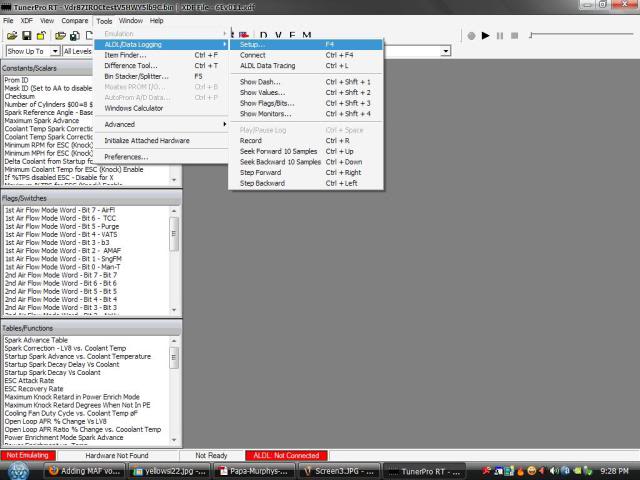
Ok, so I opened up the ADS file and under edit ALDL Datastream Definition, I opened up the Startup Coolant Temp under the ALDL Sensor Data list and changed the description to MAF volts and changed the units to Volts. Originally Posted by RBob
To place the MAF voltage in the data stream several steps are required. The first step is to edit the calibration's ALDL list. The $6E code saves the MAF voltage in location $00F3, so that needs to be edited into the ALDL list. Pick a location that isn't very helpful, such as the startup coolant temperature. Then edit the calibration by placing the address $00 $F3 there.
This is byte 9 of the stream, and is at address $67F. Currently it is $00 $60, change that to the above value $00 $F3
Save the BIN and use it in the ECM.
Second step is to modify what ever data logging program you are using. Byte 9 of the data stream will now be the MAF voltage. However, it needs to be converted differently then the start up CTS.
So change the data-logging/display to display the value with the following equation:
Volts = N / 51
N being the value from the data stream.
RBob.
Now, how do I get the display value to show up correctly in data logging session?
There is a field that says factor and one that says offset, the values that are default there I assume are incorrect because they are a conversion for a CTS sensor.
So the equation Volts = N/51
Assuming a base equation of ([X*Factor]+Offset])
and N=X
Volts = ([N*1/51]+ 0)
So if you Multiply by X * 1/51 and add a 0 offset, is this the correct translation?
Essentially, changing the Factor to .019608 and setting the Offset to 0.00?
Lucid
Senior Member
close
Sep 16, 2025
- Join DateMar 2004
- LocationSan Antonio, Tx
- Posts:813
- iTrader Positive Feedback100
- iTrader Feedback Score(4)
- Car86 Camaro Z28/ 87 Camaro IROC Z28
- Engine5.0L TPI LB9 / 5.0 TPI LB9 w/cam
- TransmissionBuilt 700R4 with Transgo shift kit
- Axle/Gears3.27 9 bolt Posi/ 2.73 10 bolt Posi
- Likes:1
- Liked:1 Time in 1 Post
This looks like it is correct, its amazing what a little tweaking can do.
Here is a quick summary of the steps:
Open the hex editor:
Scroll down to correct location:
Edit location and commit changes:
Open up the ADS file:
Edit the ALDL Definition:
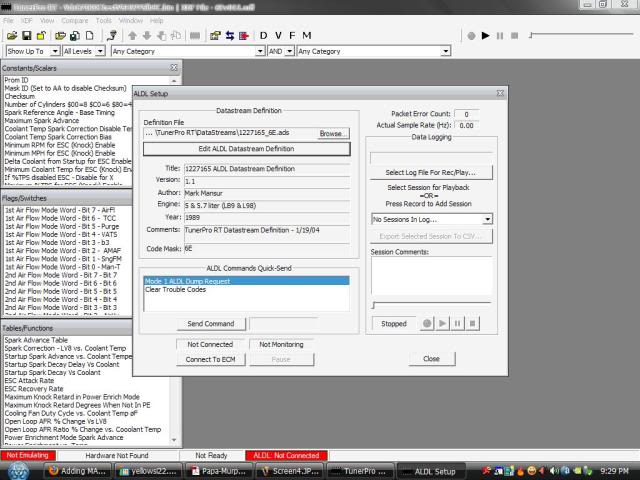
Pick a sensor that you want to modify:
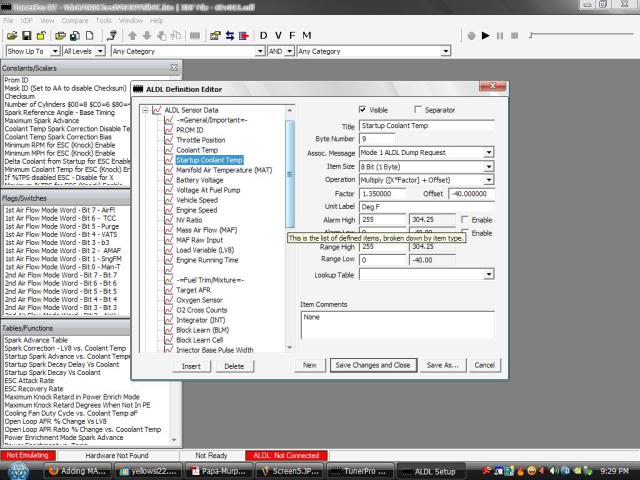
Change the parameters:
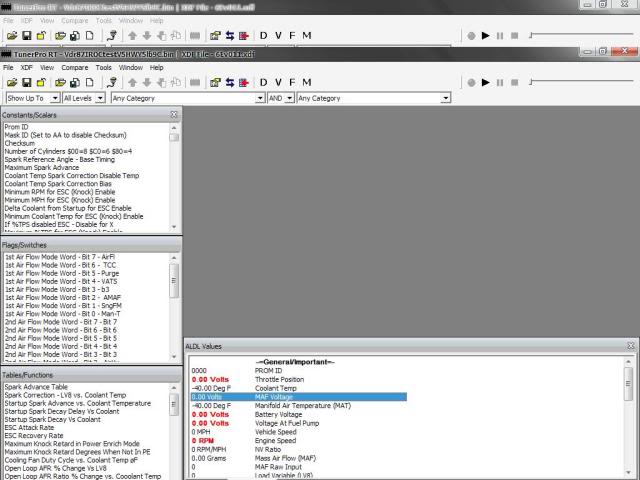
MAF voltage in data stream now:
Here is a quick summary of the steps:
Open the hex editor:
Scroll down to correct location:
Edit location and commit changes:
Open up the ADS file:
Edit the ALDL Definition:
Pick a sensor that you want to modify:
Change the parameters:
MAF voltage in data stream now:


Very nice. This should make tuning MAF tables much easier...but I never found it hard to do so anyway. I may try to do this.

Supreme Member
TPI-Formula350-
Supreme Member
close
Jul 26, 2014
I like the Maf voltage read out, anyway you can walk me through doing the in tuner pro version 5? The Hex editor is the same but the definition editor is different...thanks