


Screw getting a deck, Build a Computer! And its less than $500!


Thread Starter
Supreme Member
Joined: Apr 2004
Posts: 1,002
Likes: 0
From: Boscobel, Wisconsin
Car: 1987 Iroc-Z
Engine: 355
Transmission: 700r4 w/ about 7500 miles on rebuild
Screw getting a deck, Build a Computer! And its less than $500!
How does this sound for a computer built into the car for under $500. All the prices are found on www.mini-itx.com, www.pricewatch.com, and www.ebay.com.
1. 13cmX13cm Mini-itx motherboard - $117
The important specs as follows:
- 800Mhz processor
- DVD capable built-in graphics (couldnt find specifcs)
- 1 PS2 mouse port
- 1 PS2 keyboard port
- 1 VGA Port
- 1 Parallel
- 1 RJ-45 LAN port
- 1 RCA port (SPDIF or TV out)
- 1 S-Video port
- 2 USB 1.1 ports
- 1 Serial port
- 3 Audio jacks: line-out, line-in and mic-in
- 1 Pci slot
2. 802.11g Wireless pci card - $30
3.160GB Maxtor Harddrive (7200rpm w/ 8Mb cache buffer) - $118
4. Small Powersupply - Prolly under $20.. I need to figure out how I am going to make it shutdown when I turn the car off. I was thinking set it up laptop-style (complete with used laptop battery) and set it so when the batter goes below 90% power it goes into hibernation.
5. 512mb PCI-133 DIMM memory - $35
6. Combo CDRW 48X24X48 DVD-ROM 16X Drive - $40
7. 7.2" LCD monitor - around $90
All of this equals a sub-total of $450.
I know it will end up costing me more (little odds and ends) plus the cost of the custom mounting, but i am looking forward to doing it this summer. As for mouse operation and such, I plan on getting a touchpad to work and mounting it to the center console.. I'll have a wireless mouse in the center console compartment if I need to do any actually work. I am planning on getting a 4th gen console and either using the front of my current console or fabbing up a stereo pod (best friends bro is a welder/fabricator by trade ) and covering it in like a vinyl material or something.
Here is a pic of the motherboard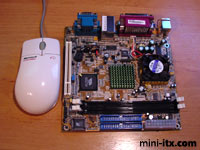
And the last pic is an idea I may use for my lcd monitor.. I cant remember who i stole it from, so if it is yours, let me know, I apologize!
1. 13cmX13cm Mini-itx motherboard - $117
The important specs as follows:
- 800Mhz processor
- DVD capable built-in graphics (couldnt find specifcs)
- 1 PS2 mouse port
- 1 PS2 keyboard port
- 1 VGA Port
- 1 Parallel
- 1 RJ-45 LAN port
- 1 RCA port (SPDIF or TV out)
- 1 S-Video port
- 2 USB 1.1 ports
- 1 Serial port
- 3 Audio jacks: line-out, line-in and mic-in
- 1 Pci slot
2. 802.11g Wireless pci card - $30
3.160GB Maxtor Harddrive (7200rpm w/ 8Mb cache buffer) - $118
4. Small Powersupply - Prolly under $20.. I need to figure out how I am going to make it shutdown when I turn the car off. I was thinking set it up laptop-style (complete with used laptop battery) and set it so when the batter goes below 90% power it goes into hibernation.
5. 512mb PCI-133 DIMM memory - $35
6. Combo CDRW 48X24X48 DVD-ROM 16X Drive - $40
7. 7.2" LCD monitor - around $90
All of this equals a sub-total of $450.
I know it will end up costing me more (little odds and ends) plus the cost of the custom mounting, but i am looking forward to doing it this summer. As for mouse operation and such, I plan on getting a touchpad to work and mounting it to the center console.. I'll have a wireless mouse in the center console compartment if I need to do any actually work. I am planning on getting a 4th gen console and either using the front of my current console or fabbing up a stereo pod (best friends bro is a welder/fabricator by trade
) and covering it in like a vinyl material or something.Here is a pic of the motherboard
And the last pic is an idea I may use for my lcd monitor.. I cant remember who i stole it from, so if it is yours, let me know, I apologize!
Thread Starter
Supreme Member
Joined: Apr 2004
Posts: 1,002
Likes: 0
From: Boscobel, Wisconsin
Car: 1987 Iroc-Z
Engine: 355
Transmission: 700r4 w/ about 7500 miles on rebuild
Didnt upload the last pic (the one of the way how I may mount my lcd screen) for some reason.. here
Also, lemme know what you guys think of this idea!
Also, lemme know what you guys think of this idea!
Last edited by Rabbitt; Mar 29, 2005 at 04:40 PM.

Supreme Member
iTrader: (1)
Joined: Oct 2004
Posts: 3,361
Likes: 2
From: Worcester, MA
Car: 86 T/A
Engine: HSR 355
Transmission: 700R4
Axle/Gears: 2.77 posi
I think it won't work well. I went through this before and here were the problems.
1. You need a laptop harddrive if that one quoted isn't. Normal ones won't take the abuse of the road.
2. Startup time sucks. Then opening a music player once booted is annoying.
3. You can't use a normal power supply. You need DCtoDC which is expensice unless you go step up then step down again. Wastes power and puts alot of stress on the charging system.
4. Navigating with a mouse is a pain.
5. 7.2" LCD monitors won't be good. They definitely won't display text clear enough to read.
1. You need a laptop harddrive if that one quoted isn't. Normal ones won't take the abuse of the road.
2. Startup time sucks. Then opening a music player once booted is annoying.
3. You can't use a normal power supply. You need DCtoDC which is expensice unless you go step up then step down again. Wastes power and puts alot of stress on the charging system.
4. Navigating with a mouse is a pain.
5. 7.2" LCD monitors won't be good. They definitely won't display text clear enough to read.


Supreme Member
iTrader: (8)
Joined: Jul 2001
Posts: 3,204
Likes: 7
From: New Boston, IL, USA
Car: '90 Formula 350
Engine: 383 SBC
Transmission: ProBuilt S/S 700-R4 & ACT 9" Stall
Axle/Gears: 10 bolt 3.23
Might work. I'm still in the process of building mine too.
I've heard of the carputer crowd running regular desktop hdds they normally vertical mount them so the heads will not flop up or down under a hit such as a pot hole. From the forums I read they do not like the IBM DeskStar hdd's at all... some actually referred to them as DeathStars. Seems they'll work for a little bit but not long before going out. Others hard drives seemed to work. Some of the members actually went as far as taking apart cd changers something about once there opened there is 2 gel packets that are used to reduce shock. You should do some research pretty funny ideas sometimes like one guy was going to use springs to cushion the blow from a hit.
The power supply is true. Some people go for DC to DC which seems to run $70 bucks or more depending on the features you want. Others go with a simple power inverter to change DC to AC and retain the OEM power supply. From what I've read some pentiums have ran off as small as 125 watt converters without problems. Note DC to AC converters are not as efficent as DC to DC but their cheaper normally. Just kind of strange going DC to AC -> PC power supply -> to DC inside the case again. Even a DC has to have the volts regulated due to a computer having several different voltage levels inside depending on the cable.
Depending on the monitor type and specs a 7.2" can have a fairly nice picture. I've read a few articles about small size screens with decent resolution.
shortyjmg: Try searching for it there was big post on that awhile back. Someone else designed a similar type setup with a screen cover that said Camaro to hide the LCD while parked for protection.
I've heard of the carputer crowd running regular desktop hdds they normally vertical mount them so the heads will not flop up or down under a hit such as a pot hole. From the forums I read they do not like the IBM DeskStar hdd's at all... some actually referred to them as DeathStars. Seems they'll work for a little bit but not long before going out. Others hard drives seemed to work. Some of the members actually went as far as taking apart cd changers something about once there opened there is 2 gel packets that are used to reduce shock. You should do some research pretty funny ideas sometimes like one guy was going to use springs to cushion the blow from a hit.
The power supply is true. Some people go for DC to DC which seems to run $70 bucks or more depending on the features you want. Others go with a simple power inverter to change DC to AC and retain the OEM power supply. From what I've read some pentiums have ran off as small as 125 watt converters without problems. Note DC to AC converters are not as efficent as DC to DC but their cheaper normally. Just kind of strange going DC to AC -> PC power supply -> to DC inside the case again. Even a DC has to have the volts regulated due to a computer having several different voltage levels inside depending on the cable.
Depending on the monitor type and specs a 7.2" can have a fairly nice picture. I've read a few articles about small size screens with decent resolution.
shortyjmg: Try searching for it there was big post on that awhile back. Someone else designed a similar type setup with a screen cover that said Camaro to hide the LCD while parked for protection.
Thread Starter
Supreme Member
Joined: Apr 2004
Posts: 1,002
Likes: 0
From: Boscobel, Wisconsin
Car: 1987 Iroc-Z
Engine: 355
Transmission: 700r4 w/ about 7500 miles on rebuild
1. Not sure about the harddrive thing, I could always cushion it or get a 120gb laptop drive.
2&3. Wired to ACC power inverter->laptop style power supply->computer.
I dont need a whole lot of power to run this. This motherboard (mini-itx), if i use a laptop cd drive, can run at as little as 60W. If i use a full size drive, it will around 100W. I want to set it up with windows so when the inverter is off, it goes to backup power but only runs for 30 seconds. enough to send into hibernate, which it will automatically will do. As soon as it detects a full power source again (as in, acc is in the ON position) it will come back from hibernate with the exact setting and positions it was at. That takes a total of like 15 seconds. Restart it every once and a while, and i'll be good. I can also have it setup so as soon as it starts up it goes straight to WMP and starts playing whatever it last played.
4. Can kinda be, but im a big playlits person. I listen to albums. And i have, currently, 10768 songs on my computer. I need another alternative, and i know i could make this work.
5. I've seen 7.2" monitors and I could read it fine, the text size just needs to be bumped up It also depends on if i use a video in or VGA. I will, of course, use VGA.
And that pic IS from the guy with the camaro plate on it.. I JUST CANT REMEMBER WHO! AH!! lol
2&3. Wired to ACC power inverter->laptop style power supply->computer.
I dont need a whole lot of power to run this. This motherboard (mini-itx), if i use a laptop cd drive, can run at as little as 60W. If i use a full size drive, it will around 100W. I want to set it up with windows so when the inverter is off, it goes to backup power but only runs for 30 seconds. enough to send into hibernate, which it will automatically will do. As soon as it detects a full power source again (as in, acc is in the ON position) it will come back from hibernate with the exact setting and positions it was at. That takes a total of like 15 seconds. Restart it every once and a while, and i'll be good. I can also have it setup so as soon as it starts up it goes straight to WMP and starts playing whatever it last played.
4. Can kinda be, but im a big playlits person. I listen to albums. And i have, currently, 10768 songs on my computer. I need another alternative, and i know i could make this work.
5. I've seen 7.2" monitors and I could read it fine, the text size just needs to be bumped up
It also depends on if i use a video in or VGA. I will, of course, use VGA.And that pic IS from the guy with the camaro plate on it.. I JUST CANT REMEMBER WHO! AH!! lol

Junior Member
Joined: Aug 2004
Posts: 8
Likes: 0
You are definetly headed down the right path. If you want a little bit of company and suggestions, head over to http://www.mp3car.com
There are a million resources on the site, and having another 3rd gen on-line will be fantastic.
There are a million resources on the site, and having another 3rd gen on-line will be fantastic.
Trending Topics
Thread Starter
Supreme Member
Joined: Apr 2004
Posts: 1,002
Likes: 0
From: Boscobel, Wisconsin
Car: 1987 Iroc-Z
Engine: 355
Transmission: 700r4 w/ about 7500 miles on rebuild
A)Would cost way more than this setup. Would still have to have a deck.
B)I have, as stated, a little under 11000 songs. I have around 50gb full of music. The larges quantity for these is about 20gb.
C)The main usage will be music, but the occasional video, or wifi hotspot screw around (for passengers only unless I am parked) will also be used.
And JoeMathers, I definitely will check them out! Thanx for giving me the site!
B)I have, as stated, a little under 11000 songs. I have around 50gb full of music. The larges quantity for these is about 20gb.
C)The main usage will be music, but the occasional video, or wifi hotspot screw around (for passengers only unless I am parked) will also be used.
And JoeMathers, I definitely will check them out! Thanx for giving me the site!
Junior Member
Joined: Aug 2004
Posts: 8
Likes: 0
Reprint from another thread at http://www.mp3car.com/vbulletin/showthread.php?t=16913
Ok this is going to be a long post so bare with me.
Shopping for PSU sucks cuz you dont know where to start or what to look for. I hope this will help you a lot.
Before you start, you need to answer a few questions first. What's the total power required for your system? This includes motherboard, fans, CPU, RAM, HDD, floppy CD-ROM, DVD-ROM, DVD-RW, CD-RW, ALL serial and USB devices such as GPS receiver, IR receiver (IRman), USB hubs serial hubs, thumb drives memory card readers, LCD monitor, VGA monitor, charactor LCD screen, ANYTHING and EVERYTHING that is connected to the motherboard and the PSU. How often do you listen to your system while the engine is not running? (You'll listen to it more often than you think). What programs will you be using? How much can you spend? What electronic skills do you have (can you soilder, read diagrams) How much room do you have for the PSU, Where do you live, How's the weather?
Once you've answered all the questions then you can shop.
Find ALL the PSUs that you could possibly order either online or mail order. This is where you have to do A LOT of search on the forum to see what are all the possible PSU candidates. You should draw a chart for comparing specs. You should try to find the followiong specs from ALL the PSU candidates: maximum output wattage, max output amperage for 12V, 5V, 3.3V, -5V, -12V, -5vSB, min/max input voltage, efficiency, teamperture range, operating humidity, dimention
input voltage should be as low as possible for minimum. This allows your PSU to supply a regulated power to your computer during engine start even if your battery is low and it barely cranks over. If the PSU has a high min input voltage like 9 or 10 volts, your carpc will reboot everytime you start your car. Maximum voltage input should be as high as possible. When the engine is running, the alternater puts out 14.5v-15v at highway speed. When you're charging the battery using a plug in the wall charger, the charger puts out 16-17 volts when the battery is fully charged (the heavy duty charger at my shop does). When your voltage regulator takes a dump, the voltage could go as high as 17 or 18 volts. If the maximum input voltage is 14v or 15v on the PSU you're gonna fry that thing more often than you think. today's car electronics are made to operate at as low as 7 volts to as high as 20 volts. That's why no matter what happens to the alternator or the battery, your car's computers and electronics will operate like it should.
The PSU output amperage is depends on what components you have. You want a PSU with high amperage rating on the 12V line and 5V line if you're gonna power an LCD screen, several hard drives and CD drives and all the USB crap you got hidden underneath the carpet.
Too often people overlook PSU efficiency. efficiency can be defined as how well the unit can convert input power into output power. Power can not be created or destroyed. It can only be changed from one form to another. Take car amps for example. Class AB amps are 50-60% efficient. That means 1000watt amp actually takes 2000 watts of power from the battery and converts 1000 watts into music and 1000 watts into heat. Class D on the other hand is more efficient at 85-95% efficient. A 1000 watt class D amp takes 1100 watts power from the batter and converts 1000 watts into music and 100 watts into heat. PSU is the same way. A low efficient PSU will take more power to do the job of a high efficient PSU. A ligh efficient PSU uses less power and saves battery power. This means you can listen to your MP3 longer. This is an advantage of a DC PSU even if it's a low efficient PSU. If you're going with an inverter and an AC PSU, think of this. A typical 120V ATX PSU is about 70% efficient and an inverter is about 90-95% efficient. Let's do our math backwards. a 250watt AC ATX PSU takes 357 watts of input power at 70% efficient. That means the inverter have to produce 357 watts to power the 250watt ATX PSU. The inverter, at 90% efficient would require nearly 400 watts to convert to 357watts of AC power to power a 250 watt AC ATX PSU. Most of the inverters have a minimum input voltage of 10V. That means everytime you start your car, the PC will reboot. What? what? A tank circuit you say?? In order for a tank circuit to work, you would need a 500 watt diode or a 40 amp diode. Diodes have a .7 volt drop when you run power from anode to cathode. If you go with an AC PSU and an inverter, your whole PSU from the battery to the motherboard will yield a 60-65% efficiency.
Teamp is also important. If you live in the desert, you'd probably know that during summer time a car's interior could get as hot as 160 degrees farenhite or higher. Don't believe that "yeah but it's dry heat" crap, 160 is freaking hot. Hell, 110 is already freaking hot during the summer here where I live. What does this mean for a PSU? Well, The glue that the maufacturers use might not hold well at such extreme heat. If the glue holding the caps or transformers gives, the caps, transformers and other crap in the PSU are held together at the soilder joints. Put that in a car going 80MPH on a freeway that's designed for 55MPH (they changed the law but they didnt change the road) and its gonna viberate loose sooner or later. You're gonna end up with a phucdup PSU with bad soilder joints. Electronic components in a PSU such as caps, transformers, coils might not be rated to tolerate the temperatures inside a car with windows up during summer time as well.
Humidity is probably not as big of a deal unless you live at a place with high humidity over 90% all year round. AC will fix that if the PC is getting that AC action.
Another spec to look for is operating G. This basically tells you how much G force will the PSU take before it blows up or something. In a car install is very important. This probably has something to do soilder joints and what G force the PSU will take before the tranformer falls off the circuit board.
Dimension is kind of important too if you don't have the room for a brick. There are tiny DC-DC ATX PSUs out there. Jeff has one thats pretty small. If you have the room, by all means buy the biggest PSU size wise you can find.
A shut down controller is only as good as how your programs react when you hit that soft off power button. Some programs such as OBD-II data logger, Street Atlas 2003 Plus will not shut down after you pushed the power button. It always ask if you want to save the current map or if you want to exit and save the data that's being logged. Some programs would just freeze up (Winamp2.83 with Ao plugin) when you hit the power button. In this case, a shut down controller won't do squat for you. You still have to stop the program manually and properly or else the computer is just going to sit there and wait for the 60 seconds or 2 minutes for the shutdown controller to cut power to the PSU and cause the computer to scan disk everytime you boot. Edit: What about hibernate and suspend to RAM? It all depends on how your hardware reacts when it's being waken up. Some hardware drivers will not work after put into hibernate or suspend.
Cost is an issue too for most people. Some people (me) would just spend the money and buy the Opus with warranty and call it a day since it's made for car use. Some people would just build one from a diagram. It's not that hard if you can read the diagram and know how to soilder. Getting the right parts may be a problem. Rat shack is not like it used to be. The cheapest way is order Jeff's shut down controller, buy an inverter and rip a power supply from a retired computer.
With all that siad, I think you should go back and re-look at all the specs of all the PSU and then decide on which PSU is the best for you. I have TONS of USB crap for my system and my Opus seems to be working just fine. It's been 4 months since I had it installed. The extra 20 bucks you spend on Opus will save you ALOT of headache later on. (unless you get a defective one. Even at, Kris will still take care of you).
Ok this is going to be a long post so bare with me.
Shopping for PSU sucks cuz you dont know where to start or what to look for. I hope this will help you a lot.
Before you start, you need to answer a few questions first. What's the total power required for your system? This includes motherboard, fans, CPU, RAM, HDD, floppy CD-ROM, DVD-ROM, DVD-RW, CD-RW, ALL serial and USB devices such as GPS receiver, IR receiver (IRman), USB hubs serial hubs, thumb drives memory card readers, LCD monitor, VGA monitor, charactor LCD screen, ANYTHING and EVERYTHING that is connected to the motherboard and the PSU. How often do you listen to your system while the engine is not running? (You'll listen to it more often than you think). What programs will you be using? How much can you spend? What electronic skills do you have (can you soilder, read diagrams) How much room do you have for the PSU, Where do you live, How's the weather?
Once you've answered all the questions then you can shop.
Find ALL the PSUs that you could possibly order either online or mail order. This is where you have to do A LOT of search on the forum to see what are all the possible PSU candidates. You should draw a chart for comparing specs. You should try to find the followiong specs from ALL the PSU candidates: maximum output wattage, max output amperage for 12V, 5V, 3.3V, -5V, -12V, -5vSB, min/max input voltage, efficiency, teamperture range, operating humidity, dimention
input voltage should be as low as possible for minimum. This allows your PSU to supply a regulated power to your computer during engine start even if your battery is low and it barely cranks over. If the PSU has a high min input voltage like 9 or 10 volts, your carpc will reboot everytime you start your car. Maximum voltage input should be as high as possible. When the engine is running, the alternater puts out 14.5v-15v at highway speed. When you're charging the battery using a plug in the wall charger, the charger puts out 16-17 volts when the battery is fully charged (the heavy duty charger at my shop does). When your voltage regulator takes a dump, the voltage could go as high as 17 or 18 volts. If the maximum input voltage is 14v or 15v on the PSU you're gonna fry that thing more often than you think. today's car electronics are made to operate at as low as 7 volts to as high as 20 volts. That's why no matter what happens to the alternator or the battery, your car's computers and electronics will operate like it should.
The PSU output amperage is depends on what components you have. You want a PSU with high amperage rating on the 12V line and 5V line if you're gonna power an LCD screen, several hard drives and CD drives and all the USB crap you got hidden underneath the carpet.
Too often people overlook PSU efficiency. efficiency can be defined as how well the unit can convert input power into output power. Power can not be created or destroyed. It can only be changed from one form to another. Take car amps for example. Class AB amps are 50-60% efficient. That means 1000watt amp actually takes 2000 watts of power from the battery and converts 1000 watts into music and 1000 watts into heat. Class D on the other hand is more efficient at 85-95% efficient. A 1000 watt class D amp takes 1100 watts power from the batter and converts 1000 watts into music and 100 watts into heat. PSU is the same way. A low efficient PSU will take more power to do the job of a high efficient PSU. A ligh efficient PSU uses less power and saves battery power. This means you can listen to your MP3 longer. This is an advantage of a DC PSU even if it's a low efficient PSU. If you're going with an inverter and an AC PSU, think of this. A typical 120V ATX PSU is about 70% efficient and an inverter is about 90-95% efficient. Let's do our math backwards. a 250watt AC ATX PSU takes 357 watts of input power at 70% efficient. That means the inverter have to produce 357 watts to power the 250watt ATX PSU. The inverter, at 90% efficient would require nearly 400 watts to convert to 357watts of AC power to power a 250 watt AC ATX PSU. Most of the inverters have a minimum input voltage of 10V. That means everytime you start your car, the PC will reboot. What? what? A tank circuit you say?? In order for a tank circuit to work, you would need a 500 watt diode or a 40 amp diode. Diodes have a .7 volt drop when you run power from anode to cathode. If you go with an AC PSU and an inverter, your whole PSU from the battery to the motherboard will yield a 60-65% efficiency.
Teamp is also important. If you live in the desert, you'd probably know that during summer time a car's interior could get as hot as 160 degrees farenhite or higher. Don't believe that "yeah but it's dry heat" crap, 160 is freaking hot. Hell, 110 is already freaking hot during the summer here where I live. What does this mean for a PSU? Well, The glue that the maufacturers use might not hold well at such extreme heat. If the glue holding the caps or transformers gives, the caps, transformers and other crap in the PSU are held together at the soilder joints. Put that in a car going 80MPH on a freeway that's designed for 55MPH (they changed the law but they didnt change the road) and its gonna viberate loose sooner or later. You're gonna end up with a phucdup PSU with bad soilder joints. Electronic components in a PSU such as caps, transformers, coils might not be rated to tolerate the temperatures inside a car with windows up during summer time as well.
Humidity is probably not as big of a deal unless you live at a place with high humidity over 90% all year round. AC will fix that if the PC is getting that AC action.
Another spec to look for is operating G. This basically tells you how much G force will the PSU take before it blows up or something. In a car install is very important. This probably has something to do soilder joints and what G force the PSU will take before the tranformer falls off the circuit board.
Dimension is kind of important too if you don't have the room for a brick. There are tiny DC-DC ATX PSUs out there. Jeff has one thats pretty small. If you have the room, by all means buy the biggest PSU size wise you can find.
A shut down controller is only as good as how your programs react when you hit that soft off power button. Some programs such as OBD-II data logger, Street Atlas 2003 Plus will not shut down after you pushed the power button. It always ask if you want to save the current map or if you want to exit and save the data that's being logged. Some programs would just freeze up (Winamp2.83 with Ao plugin) when you hit the power button. In this case, a shut down controller won't do squat for you. You still have to stop the program manually and properly or else the computer is just going to sit there and wait for the 60 seconds or 2 minutes for the shutdown controller to cut power to the PSU and cause the computer to scan disk everytime you boot. Edit: What about hibernate and suspend to RAM? It all depends on how your hardware reacts when it's being waken up. Some hardware drivers will not work after put into hibernate or suspend.
Cost is an issue too for most people. Some people (me) would just spend the money and buy the Opus with warranty and call it a day since it's made for car use. Some people would just build one from a diagram. It's not that hard if you can read the diagram and know how to soilder. Getting the right parts may be a problem. Rat shack is not like it used to be. The cheapest way is order Jeff's shut down controller, buy an inverter and rip a power supply from a retired computer.
With all that siad, I think you should go back and re-look at all the specs of all the PSU and then decide on which PSU is the best for you. I have TONS of USB crap for my system and my Opus seems to be working just fine. It's been 4 months since I had it installed. The extra 20 bucks you spend on Opus will save you ALOT of headache later on. (unless you get a defective one. Even at, Kris will still take care of you).

Senior Member
iTrader: (1)
Joined: Jan 2002
Posts: 575
Likes: 0
From: MI
Car: I
Engine: Taunt
Transmission: Mustangs
Originally posted by Rabbitt
A)Would cost way more than this setup. Would still have to have a deck.
B)I have, as stated, a little under 11000 songs. I have around 50gb full of music. The larges quantity for these is about 20gb.
C)The main usage will be music, but the occasional video, or wifi hotspot screw around (for passengers only unless I am parked) will also be used.
A)Would cost way more than this setup. Would still have to have a deck.
B)I have, as stated, a little under 11000 songs. I have around 50gb full of music. The larges quantity for these is about 20gb.
C)The main usage will be music, but the occasional video, or wifi hotspot screw around (for passengers only unless I am parked) will also be used.
You're off on the cost. I bought the 20 gig eXcelon keg and kenwoods second best eXcelon deck for $600. You could easily save more than $100 on a cheaper deck. You can also get a replacement DMS (the kegs removable hard drive) with up to an 80 gig capacity, but now your talking an extra $300+. Kenwood also has a media keg (music, movies, pics, ect.) that they keep saying they are going to release but still haven't. Who knows when it will actually hit the market.
Don't get me wrong, I appreciate what you are looking at doing. I just wanted to make sure you, or anyone else reading this thread, is aware of what's out there.
Good luck!!


Senior Member
Joined: Mar 2003
Posts: 523
Likes: 0
From: Marion, Iowa
Car: 92 Camaro
Engine: ZZ4 Crate Engine w/Hot Cam
Transmission: Rebuilt 700R4 with Transgo and MW 3
Axle/Gears: 3.73 Eaton Posi
Get a laptop
If I was you I would go for a laptop. They are ready to go, made for the road and if all you need is an MP3 player you could get some slow-*** Pentium for cheap.
Good idea though - I might try that too.
Good idea though - I might try that too.

Member
Joined: Oct 2001
Posts: 264
Likes: 0
From: Webster, MA
Car: 1982 Camaro Z28
Engine: Self-built 350
Transmission: Pro-Built 700r4 w/2800 Vigilante
Axle/Gears: Eaton 3.73 w/Moser axles
FYI, the pictures with the LCD screen above are from Jim85IROC's car.
http://www.cardomain.com/memberpage/631053/2
http://www.cardomain.com/memberpage/631053/2
Thread Starter
Supreme Member
Joined: Apr 2004
Posts: 1,002
Likes: 0
From: Boscobel, Wisconsin
Car: 1987 Iroc-Z
Engine: 355
Transmission: 700r4 w/ about 7500 miles on rebuild
Originally posted by JoeMathers
By the way, rabbitt, is that your car in the pictures? If so, what did you use to build the extention on the center console?
By the way, rabbitt, is that your car in the pictures? If so, what did you use to build the extention on the center console?
Thanx for the info. Im checking out everything.
I know i will make this work tho 
Member
iTrader: (1)
Joined: Oct 2000
Posts: 396
Likes: 0
From: Toms River, NJ
Car: 1991 Camaro Z28
Engine: 350 TPI
Transmission: T56 6-Speed
You won't need a laptop harddrive, I've had a computer in my camaro for over 2 years already and it's still fine, although padding wouldn't hurt..
You'll be able to read text fine as long as the screen is VGA.. If you're using tvout then forget about reading text..
Power inverters work fine, I use a Jeff Mucha shutdown controller to allow the inverter to stay on for 30 seconds (setable by a dial), then it automatically "presses the power button" and the computer hibernates within like 20 seconds or so, then after that 30 seconds is up it kills power to the inverter.. Bootup time is no more than 15-20 seconds.. I never have to press a button to shutdown/startup.. Just turn the key.. Here's the new version he makes sold by MP3car.com now.. http://www.mp3car.com/store/product_...products_id=58
I took out my driver side seat bottom and made a cover/flat platform with some "egg crate" foam padding and carpeted it and I have my computer on top, I still have to make a cover for the computer itself beacuse it's made of plexiglass and is very noticeable.. I just used a MicroATX motherboard, bigger than the mini itx but smaller than a standard MB.. Unfortunally the sub box I had built by Jim leaves me no room in the trunk area at all beacuse im insane..
It all works very well, you can even get a GPS reciever and software and engine monitoring software. I have one in the GTP also and I have an OBD-II scanner and I can log my track runs.. I reccommend using media software from mp3car.com software "frontend" forum, they are coded by users there and most are available free.. They mostly use winamp or WMP to play the music but are skinable.. I used to have a headunit less install, but I prefered having a **** for volume and also some FM radio.. Good luck!
You'll be able to read text fine as long as the screen is VGA.. If you're using tvout then forget about reading text..
Power inverters work fine, I use a Jeff Mucha shutdown controller to allow the inverter to stay on for 30 seconds (setable by a dial), then it automatically "presses the power button" and the computer hibernates within like 20 seconds or so, then after that 30 seconds is up it kills power to the inverter.. Bootup time is no more than 15-20 seconds.. I never have to press a button to shutdown/startup.. Just turn the key.. Here's the new version he makes sold by MP3car.com now.. http://www.mp3car.com/store/product_...products_id=58
I took out my driver side seat bottom and made a cover/flat platform with some "egg crate" foam padding and carpeted it and I have my computer on top, I still have to make a cover for the computer itself beacuse it's made of plexiglass and is very noticeable.. I just used a MicroATX motherboard, bigger than the mini itx but smaller than a standard MB.. Unfortunally the sub box I had built by Jim leaves me no room in the trunk area at all beacuse im insane..
It all works very well, you can even get a GPS reciever and software and engine monitoring software. I have one in the GTP also and I have an OBD-II scanner and I can log my track runs.. I reccommend using media software from mp3car.com software "frontend" forum, they are coded by users there and most are available free.. They mostly use winamp or WMP to play the music but are skinable.. I used to have a headunit less install, but I prefered having a **** for volume and also some FM radio.. Good luck!

Member
Joined: Jun 2004
Posts: 321
Likes: 0
From: Edmonton, AB, Canada
Car: 1982 Camaro Z28
Engine: 350
Transmission: Auto
Axle/Gears: 10 bolt auburn posi 3.73
 yeah, that would rule


Yeah, I second the you don't need a laptop HDD. Mine survived 2 years and over 30,000 miles in two cars without any problems at all.
I used DOS instead of Windows and startup time was extremely quick, normally by the time I made it out the driveway it was playing. Besides I used it for longer trips normally so it wasn't a big deal.
I didn't use a 12v power supply, I just used a 300 watt power invertor that wasn't a big deal. No deal alternators and no problems.
I used DOS instead of Windows and startup time was extremely quick, normally by the time I made it out the driveway it was playing. Besides I used it for longer trips normally so it wasn't a big deal.
I didn't use a 12v power supply, I just used a 300 watt power invertor that wasn't a big deal. No deal alternators and no problems.

Member
Joined: Oct 2004
Posts: 145
Likes: 0
From: Yuma, AZ
Car: 1992 camaro rs T-top
Engine: 305 ci V8 TBI
so if you were to put a computer in your car were you would you put the powersuply,cd-rom and such things. Im thinking about doing this also. I build computers for a hobby right now and i have some spare parts laying around. just need a tip on where to put this stuff at.
Member
iTrader: (1)
Joined: Oct 2000
Posts: 396
Likes: 0
From: Toms River, NJ
Car: 1991 Camaro Z28
Engine: 350 TPI
Transmission: T56 6-Speed
Oops, well TGO was all slow when I made my post and it would not go through for nothing, I even reloaded the thread several times and the post never showed up and now it's there 3 times.. Go figure.. Can't even erase em.
As for my screen, heh you don't want to see that now, most of my stereo is half assed right now.. I have a 4thgen console, and there was nothing there for the radio area anymore, so I just took some aluminum brackets and whipped up something just to hold the stuff in place.. It's a hack job right now.. I'm going to be getting a new screen eventually, then I'll build something out of wood/fiberglass probably.. If I ever get around to it..I tend to start things and never finish them.. For me my rom and all that stuff is in my computer case, and I stuffed the shutdown controller and inverter underneath the platform where the rear driver seat normally is.. no one is ever back there anyway so I figured what the hell..
As for my screen, heh you don't want to see that now, most of my stereo is half assed right now.. I have a 4thgen console, and there was nothing there for the radio area anymore, so I just took some aluminum brackets and whipped up something just to hold the stuff in place.. It's a hack job right now.. I'm going to be getting a new screen eventually, then I'll build something out of wood/fiberglass probably.. If I ever get around to it..I tend to start things and never finish them.. For me my rom and all that stuff is in my computer case, and I stuffed the shutdown controller and inverter underneath the platform where the rear driver seat normally is.. no one is ever back there anyway so I figured what the hell..
Last edited by SLAYER6669; Mar 31, 2005 at 04:04 PM.

Supreme Member
Joined: Apr 2001
Posts: 5,675
Likes: 3
From: Changing Tires
Car: too many ...
I'm still trying to figgure out how you plan to run your audio system with no deck. The computer stuff is fine, but how do you plan to interface it with the speakers in the car? My only guess is a connection from the PC to an amp, but then that means you gotta also buy an amp to do it this way (which adds cost). Another question I have is how good the output from the PC will be. I imagine you're not gonna be using some top end sound card or anything, more likely the onboard motherboard audio stuff, which is usually not very good. Sorry to play devils advocate, but I think those two things should be considered.
I also plan to run a CPU in my car. I plan to connect the audio out to my deck (Eclipse flip out) which in turn will run pre-outs to the amps, but also get a second LCD screen for the CPU display. I want the CPU because I want to run datalogging stuff as well as tuning stuff for the ECM swap I plan. For my setup, I decided to go with a modified X-Box. You can swap out the stock X-Box HDD with a bigger one, the rest of the CPU hardware is all there, good form factor, and all issues as far as cooling and whatnot already addresses. It also had USB support and the ability to mount remote drives. Then you use the newer mod chips which will allow you to choose between booting the OS of your choice, or the regular X-Box software to play X-Box games. It will boot to a prompt when you power on the car so you dont have to deal with waiting for any OS to load or shutdown before powering off the car. And its cheap, I got the X-Box for under $100, rest of the mods run another few hundred, then you need the power inverter. I think thats the best way to go, just my opinion though ....
I also plan to run a CPU in my car. I plan to connect the audio out to my deck (Eclipse flip out) which in turn will run pre-outs to the amps, but also get a second LCD screen for the CPU display. I want the CPU because I want to run datalogging stuff as well as tuning stuff for the ECM swap I plan. For my setup, I decided to go with a modified X-Box. You can swap out the stock X-Box HDD with a bigger one, the rest of the CPU hardware is all there, good form factor, and all issues as far as cooling and whatnot already addresses. It also had USB support and the ability to mount remote drives. Then you use the newer mod chips which will allow you to choose between booting the OS of your choice, or the regular X-Box software to play X-Box games. It will boot to a prompt when you power on the car so you dont have to deal with waiting for any OS to load or shutdown before powering off the car. And its cheap, I got the X-Box for under $100, rest of the mods run another few hundred, then you need the power inverter. I think thats the best way to go, just my opinion though ....
Thread Starter
Supreme Member
Joined: Apr 2004
Posts: 1,002
Likes: 0
From: Boscobel, Wisconsin
Car: 1987 Iroc-Z
Engine: 355
Transmission: 700r4 w/ about 7500 miles on rebuild
Was planning on the Amp in the first place. I never run speakers off of the deck, so i would have an amp either way. I dont have a deck currently, so it would just be another added cost in adding one when i wont really need it. This computer is going to be my 'deck'. It will cost me around $500, will have a lot more features than if i bought a deck at a comparitive price.
Also, the onboard audio of this motherboard is perfectly fine (via '97 blahblahblah), i've used it on the computer i have right now and it sounds great. Otherwise, i will get either a soundblaster USB soundcard or i will just get a soundcard to go into the one PCI slot that i currently have and use a usb wireless adapter instead of a PCI one. I can get one for a decent price. I plan on running a 12v wire from the acc that will turn the amps on when the computer turns on. Any problems i may have i'll work through in the next few months.. i dont plan on starting this until mid-late summer.
Also, the reason i want to do this is because i find it somewhat unique and the idea of building a brand new system into the car like intrigues me...
Also, the onboard audio of this motherboard is perfectly fine (via '97 blahblahblah), i've used it on the computer i have right now and it sounds great.
Otherwise, i will get either a soundblaster USB soundcard or i will just get a soundcard to go into the one PCI slot that i currently have and use a usb wireless adapter instead of a PCI one. I can get one for a decent price. I plan on running a 12v wire from the acc that will turn the amps on when the computer turns on. Any problems i may have i'll work through in the next few months.. i dont plan on starting this until mid-late summer. Also, the reason i want to do this is because i find it somewhat unique and the idea of building a brand new system into the car like intrigues me...
Last edited by Rabbitt; Apr 2, 2005 at 08:21 AM.
Member
iTrader: (1)
Joined: Oct 2000
Posts: 396
Likes: 0
From: Toms River, NJ
Car: 1991 Camaro Z28
Engine: 350 TPI
Transmission: T56 6-Speed
My camaro has a sound blaster audigy in it.. Sounds great, then again most people dont want a big clumsy computer in their backseat.. The grand prix has a sound blaster MP3+ which is an external USB sound card with RCA jacks right on the unit.. It also sounds just fine and is fairly cheap.. I too used to just go out from the computer and into the AMP with RCA's before I bought a new HU.. Here's the MP3+ http://www.compusa.com/products/prod...979&pfp=BROWSE
I've read about the Xbox thing before also.. I think a friend of mine did that or is going to do it.. I never really looked into it myself.. Defintely a good idea.
I've read about the Xbox thing before also.. I think a friend of mine did that or is going to do it.. I never really looked into it myself.. Defintely a good idea.
Member
iTrader: (1)
Joined: Oct 2000
Posts: 396
Likes: 0
From: Toms River, NJ
Car: 1991 Camaro Z28
Engine: 350 TPI
Transmission: T56 6-Speed
MiniITX boards lack PCI slots, I think they have one.. The purpose of them is the size (extremely small) so that's why they have the onboard audio.. Adding a PCI card will effect the spot you want to put the computer if you don't want the card sticking up, so the MP3+ is a good solution if you don't want to use the onboard, and it's small and easy enough to hide..
Thread Starter
Supreme Member
Joined: Apr 2004
Posts: 1,002
Likes: 0
From: Boscobel, Wisconsin
Car: 1987 Iroc-Z
Engine: 355
Transmission: 700r4 w/ about 7500 miles on rebuild
im more concerned with two dimentions of space. I still plan on having a wireless PCI card, tho that mp3+ is looking like a really good way to go.. Thanx!

Member
Joined: Nov 2004
Posts: 386
Likes: 0
Car: 1992 Firebird T-Tops
Engine: V6
Transmission: Auto
Originally posted by SLAYER6669
MiniITX boards lack PCI slots, I think they have one..
MiniITX boards lack PCI slots, I think they have one..
when you talk about hiding them, do you mean they can virtually fit under the dash somewhere and be totally hidden? i'm becoming more and more interested - this is sounding good.
Thread Starter
Supreme Member
Joined: Apr 2004
Posts: 1,002
Likes: 0
From: Boscobel, Wisconsin
Car: 1987 Iroc-Z
Engine: 355
Transmission: 700r4 w/ about 7500 miles on rebuild
Re: Screw getting a deck, Build a Computer! And its less than $500!
Originally posted by Rabbitt
1. 13cmX13cm Mini-itx motherboard - $117
The important specs as follows:
- 800Mhz processor
- DVD capable built-in graphics (couldnt find specifcs)
- 1 PS2 mouse port
- 1 PS2 keyboard port
- 1 VGA Port
- 1 Parallel
- 1 RJ-45 LAN port
- 1 RCA port (SPDIF or TV out)
- 1 S-Video port
- 2 USB 1.1 ports
- 1 Serial port
- 3 Audio jacks: line-out, line-in and mic-in
- 1 Pci slot
1. 13cmX13cm Mini-itx motherboard - $117
The important specs as follows:
- 800Mhz processor
- DVD capable built-in graphics (couldnt find specifcs)
- 1 PS2 mouse port
- 1 PS2 keyboard port
- 1 VGA Port
- 1 Parallel
- 1 RJ-45 LAN port
- 1 RCA port (SPDIF or TV out)
- 1 S-Video port
- 2 USB 1.1 ports
- 1 Serial port
- 3 Audio jacks: line-out, line-in and mic-in
- 1 Pci slot
And, when hiding In-dash.. check your clearances, all of the available space and how much ur comp will take. Also, make sure it can be ventilated enough - dont want it to get way to hot back there. I plan on building a case fan into the area i put the computer
. Member
iTrader: (1)
Joined: Oct 2000
Posts: 396
Likes: 0
From: Toms River, NJ
Car: 1991 Camaro Z28
Engine: 350 TPI
Transmission: T56 6-Speed
You can hide it where ever it will fit, but like Rabbitt said, the CPU needs air or it'll overheat.. The MiniITX's are tiny, especially if you don't put a PCI card on it.. Most people build little cases for it and hide it under a seat, or in a console etc..
http://www.mini-itx.com/news/images/story0292-03L.jpg You can get an idea of the size of the MiniITX motherboards by just looking at the size of the PCI slot and the back connectors in comparison to the size of the entire board..
http://www.mini-itx.com/news/images/story0292-03L.jpg You can get an idea of the size of the MiniITX motherboards by just looking at the size of the PCI slot and the back connectors in comparison to the size of the entire board..
Supreme Member
Joined: Apr 2001
Posts: 5,675
Likes: 3
From: Changing Tires
Car: too many ...
I still question the quality of the output from the PC to the Amp. I know it will work, but I really dont think the quality will be that good. Decks are good because they have both passive and active crossovers, as well as high voltage pre-amp outs for a strong clear signal to the amp. The output from the PC will be single channel, and low signal. You might as well plug a portable CD player walkman type unit into the amp, its will be basically the same as far as signal. The only advantage you'll have from the PC is a software EQ which will allow you for compensate somewhat, but IMO, its not going to be enough for a high power system. On a bang'n system, the amp will pronounce this junk signal. I dont mean to put down your ideas or anything, I'm sure you will continue your project regardless of what I say. But I want to point this out for other people that read this and consider going this route.
Thread Starter
Supreme Member
Joined: Apr 2004
Posts: 1,002
Likes: 0
From: Boscobel, Wisconsin
Car: 1987 Iroc-Z
Engine: 355
Transmission: 700r4 w/ about 7500 miles on rebuild
Hmm.. not to anger you or anything, but do you have any data backing up your claim on the signal strength. I mean, i'm planning on looking into it, maybe i will change my mind, who knows, but I cant find anything information that supports that.. The crossovers, ya, ur right on that. Meh, I may end up getting a deck, i may not. I've listened a laptop using just a y 3.5mm to rca adapter on a system (straight to the amps) and it has sounded just fine to me, bass as well as the music...but that wasnt my car, and I didnt hear it for long.
I mean, I personally would think that http://www.soundblaster.com/products/mp3+/ would have more than enough quality and power to give a clear signal to the amps..
The crossovers, ya, ur right on that. Meh, I may end up getting a deck, i may not. I've listened a laptop using just a y 3.5mm to rca adapter on a system (straight to the amps) and it has sounded just fine to me, bass as well as the music...but that wasnt my car, and I didnt hear it for long.I mean, I personally would think that http://www.soundblaster.com/products/mp3+/ would have more than enough quality and power to give a clear signal to the amps..
Supreme Member
Joined: Apr 2001
Posts: 5,675
Likes: 3
From: Changing Tires
Car: too many ...
No I dont have any data to back up my concern. The reason I question it is because like you, I dont know the specs of the SB card output. Decks have multiple pre-amp outs with a specific voltage, the higher the voltage the clearer the signal. I dont see SB advertising their equipment with regards to car audio, so thats why I question it. For all I know it might turn out great, and if thats the case, then good for all of us. But I think it would be worthwhile to consider it before spending money to find out. I dont really think this would be a huge problem if you had an average system. But for those guys with multiple amps and crazy systems, they might actually notice a difference in sound quality.
In my experience w/ it, using an old SB16 card for DOS, SQ wasn't great. It was normally kinda quiet and sounded a bit flat. However, it didn't sound much worse then a CD that had MP3s converted to CD Audio. It also had a lot to do w/ the MP3, as some have the volume up or down, and quality between 128 and 192, etc.
This was through a Pioneer DEH-77 1.5 DIN deck using the CD Changer to RCA convertor, and a Pioneer 6200 (I think, it got stolen, so don't really remember) using the same CD/RCA convertor cable.
I also ran it straight through the amp and found it much easier to run it through the head unit, but that was just because I didn't have a LCD screen for the MP3 player and volume control was a bit more difficult.
This was through a Pioneer DEH-77 1.5 DIN deck using the CD Changer to RCA convertor, and a Pioneer 6200 (I think, it got stolen, so don't really remember) using the same CD/RCA convertor cable.
I also ran it straight through the amp and found it much easier to run it through the head unit, but that was just because I didn't have a LCD screen for the MP3 player and volume control was a bit more difficult.
Thread Starter
Supreme Member
Joined: Apr 2004
Posts: 1,002
Likes: 0
From: Boscobel, Wisconsin
Car: 1987 Iroc-Z
Engine: 355
Transmission: 700r4 w/ about 7500 miles on rebuild
hehe, i wish i could buy all of this stuff, try it out, and if it didnt sound up to what i would want it to, then i could send it all back..
An option would be to buy the soundcard you plan on using, install it in a pc, drag it out the car and hook it up the way it will be hooked up, turn it on, and see if you like it or not. Reduces the cost down to just the sound card.

Senior Member

Joined: Jul 2003
Posts: 604
Likes: 0
From: Howard Beach, NYC
Car: 1990 TA
Engine: LB9 305
Transmission: 4L60
You could also skip Windos and use Linux if feeling adventurous.
Regarding the PCI cards, I recently saw a riser card on eBay that uses one spot, and had two PCI slots off at a 90 degree angle. I don't know how well this works, but it may be worth looking into...
Regarding the PCI cards, I recently saw a riser card on eBay that uses one spot, and had two PCI slots off at a 90 degree angle. I don't know how well this works, but it may be worth looking into...
Thread Starter
Supreme Member
Joined: Apr 2004
Posts: 1,002
Likes: 0
From: Boscobel, Wisconsin
Car: 1987 Iroc-Z
Engine: 355
Transmission: 700r4 w/ about 7500 miles on rebuild
Hmm, i'll look into that.. I wish i knew someone that has that MP3+, because it does look like it would work.. i wish i knew at what bitrate the outgoing signal comes out of most decks..
Member
Joined: Nov 2004
Posts: 386
Likes: 0
Car: 1992 Firebird T-Tops
Engine: V6
Transmission: Auto
Originally posted by Goumba T
You could also skip Windos and use Linux if feeling adventurous.
You could also skip Windos and use Linux if feeling adventurous.
Senior Member
Joined: Jul 2003
Posts: 604
Likes: 0
From: Howard Beach, NYC
Car: 1990 TA
Engine: LB9 305
Transmission: 4L60
[QUOTE]Originally posted by sesand
I was thinking about that, myself - would save $125 at least. This may be a silly question, but are there compatibility issues doing that? Can you just throw in any mp3 CD, or does it have to be specially formatted? Does it work with hard drive mp3 players? [/QUOTE
Most CDs use a standard filesystem (ISO9660), an MP3 CD is just that filesystem full of MP3s. Even with most Microsoft extensions, Linux will read it.
What do you mean by hard drive MP3 players, like Nomad or iPod? I don't have one, so to be honest I wouldn't even know because I haven't looked, but there's probably something out there. Take a look before making your decision, that's all I can say.
Also, as far as the issue mentioned above about starting up the PC then having to start the MP3 player, etc, Linux can be set up to login in automatically, start whatever program you want. I think Windows can too, but I can't find the auto login option. Setting it up this way will be easier, not to mention safer, should you decide to start it up at some time other than when you first get in the car or if the system should fail and come back online.
I was thinking about that, myself - would save $125 at least. This may be a silly question, but are there compatibility issues doing that? Can you just throw in any mp3 CD, or does it have to be specially formatted? Does it work with hard drive mp3 players? [/QUOTE
Most CDs use a standard filesystem (ISO9660), an MP3 CD is just that filesystem full of MP3s. Even with most Microsoft extensions, Linux will read it.
What do you mean by hard drive MP3 players, like Nomad or iPod? I don't have one, so to be honest I wouldn't even know because I haven't looked, but there's probably something out there. Take a look before making your decision, that's all I can say.
Also, as far as the issue mentioned above about starting up the PC then having to start the MP3 player, etc, Linux can be set up to login in automatically, start whatever program you want. I think Windows can too, but I can't find the auto login option. Setting it up this way will be easier, not to mention safer, should you decide to start it up at some time other than when you first get in the car or if the system should fail and come back online.
Member
Joined: Nov 2004
Posts: 386
Likes: 0
Car: 1992 Firebird T-Tops
Engine: V6
Transmission: Auto
Originally posted by Goumba T
What do you mean by hard drive MP3 players, like Nomad or iPod? I don't have one, so to be honest I wouldn't even know because I haven't looked, but there's probably something out there. Take a look before making your decision, that's all I can say.
[/B]
What do you mean by hard drive MP3 players, like Nomad or iPod? I don't have one, so to be honest I wouldn't even know because I haven't looked, but there's probably something out there. Take a look before making your decision, that's all I can say.
[/B]
I figured some type of hard drive mp3 player would probably be the easiest way to transfer the files to the carputer (unless you have lots of cd's). I'm sure they post compatibility on the box, I was just being lazy and decided to ask
Good to know the ISO9660 is universal, thanks.
Senior Member
Joined: Jul 2003
Posts: 604
Likes: 0
From: Howard Beach, NYC
Car: 1990 TA
Engine: LB9 305
Transmission: 4L60
Originally posted by sesand
I figured some type of hard drive mp3 player would probably be the easiest way to transfer the files to the carputer (unless you have lots of cd's). I'm sure they post compatibility on the box, I was just being lazy and decided to ask
I figured some type of hard drive mp3 player would probably be the easiest way to transfer the files to the carputer (unless you have lots of cd's). I'm sure they post compatibility on the box, I was just being lazy and decided to ask
If it acts as a USB hard drive, it probably will work, but not 100%. I have a generic enclosure I use with my PC that takes a normal 3.5" drive, and it works fine. Linux will usually recognize it as a SCSI device.
Also a DVD+-RW would work. As big as the smaller hard drive players and you can erase it after transferring to the car and put a movie on it to watch in the car.
Good to know the ISO9660 is universal, thanks.
Member
Joined: Nov 2004
Posts: 386
Likes: 0
Car: 1992 Firebird T-Tops
Engine: V6
Transmission: Auto
My current HU supports both Joliet and ISO. The only extensions I'm concerned with are mp3, wav, avi, mpg, or any other movie/music extensions i may have. DVD's would be nice, too.
Portable mp3 hard drive players generally transmit via USB, FireWire, and/or Ethernet cable.
It's all clear to me now: anything in a store is made by someone who wants to make a profit - I can see why they wouldn't say anything about Linux
mmmm DVD+RW - I need more toys!
Portable mp3 hard drive players generally transmit via USB, FireWire, and/or Ethernet cable.
It's all clear to me now: anything in a store is made by someone who wants to make a profit - I can see why they wouldn't say anything about Linux
mmmm DVD+RW - I need more toys!
Thread Starter
Supreme Member
Joined: Apr 2004
Posts: 1,002
Likes: 0
From: Boscobel, Wisconsin
Car: 1987 Iroc-Z
Engine: 355
Transmission: 700r4 w/ about 7500 miles on rebuild
Meh, im planning oh transfering the bulk of my mp3's in the house, and then taking the harddrive back out and transfering, lets say, albums via wireless
Member
iTrader: (1)
Joined: Oct 2000
Posts: 396
Likes: 0
From: Toms River, NJ
Car: 1991 Camaro Z28
Engine: 350 TPI
Transmission: T56 6-Speed
I've got wireless PCI cards in both cars and a wireless router in the house, it works kinda eh.. You can't be very far or the signal sucks and transfer speed suffers.. You can buy the better antenna's for both the router and cards, but they are expensive and I'm afraid to waste any money on them beacuse I bet they won't do much. I have a USB flash drive that's 128mb to transfer small stuff also.. Worst case I just wait 4-6 mo to gather a huge amount of music and then I just pull the computer and bring it in and transfer that way.. for me it's as simple as just unplugging the connectors on the CPU so it literally takes about 2 minutes.. (which is kind of a bad thing, easy to steal)

Supreme Member
Joined: Mar 2002
Posts: 3,281
Likes: 0
From: Austin, Texas
Car: 2000 Trans Am WS6 (Black)
Engine: LS1
Transmission: 4L60E
Originally posted by CrazyHawaiian
I'm still trying to figgure out how you plan to run your audio system with no deck. The computer stuff is fine, but how do you plan to interface it with the speakers in the car? My only guess is a connection from the PC to an amp, but then that means you gotta also buy an amp to do it this way (which adds cost). Another question I have is how good the output from the PC will be. I imagine you're not gonna be using some top end sound card or anything, more likely the onboard motherboard audio stuff, which is usually not very good. Sorry to play devils advocate, but I think those two things should be considered.
I also plan to run a CPU in my car. I plan to connect the audio out to my deck (Eclipse flip out) which in turn will run pre-outs to the amps, but also get a second LCD screen for the CPU display. I want the CPU because I want to run datalogging stuff as well as tuning stuff for the ECM swap I plan. For my setup, I decided to go with a modified X-Box. You can swap out the stock X-Box HDD with a bigger one, the rest of the CPU hardware is all there, good form factor, and all issues as far as cooling and whatnot already addresses. It also had USB support and the ability to mount remote drives. Then you use the newer mod chips which will allow you to choose between booting the OS of your choice, or the regular X-Box software to play X-Box games. It will boot to a prompt when you power on the car so you dont have to deal with waiting for any OS to load or shutdown before powering off the car. And its cheap, I got the X-Box for under $100, rest of the mods run another few hundred, then you need the power inverter. I think thats the best way to go, just my opinion though ....
I'm still trying to figgure out how you plan to run your audio system with no deck. The computer stuff is fine, but how do you plan to interface it with the speakers in the car? My only guess is a connection from the PC to an amp, but then that means you gotta also buy an amp to do it this way (which adds cost). Another question I have is how good the output from the PC will be. I imagine you're not gonna be using some top end sound card or anything, more likely the onboard motherboard audio stuff, which is usually not very good. Sorry to play devils advocate, but I think those two things should be considered.
I also plan to run a CPU in my car. I plan to connect the audio out to my deck (Eclipse flip out) which in turn will run pre-outs to the amps, but also get a second LCD screen for the CPU display. I want the CPU because I want to run datalogging stuff as well as tuning stuff for the ECM swap I plan. For my setup, I decided to go with a modified X-Box. You can swap out the stock X-Box HDD with a bigger one, the rest of the CPU hardware is all there, good form factor, and all issues as far as cooling and whatnot already addresses. It also had USB support and the ability to mount remote drives. Then you use the newer mod chips which will allow you to choose between booting the OS of your choice, or the regular X-Box software to play X-Box games. It will boot to a prompt when you power on the car so you dont have to deal with waiting for any OS to load or shutdown before powering off the car. And its cheap, I got the X-Box for under $100, rest of the mods run another few hundred, then you need the power inverter. I think thats the best way to go, just my opinion though ....
the only problem I have, is I WAS going to put a PC in my car, so I bought a 12" VGA LCD screen.. now I don't want to dish out any more dough for an RCA screen...
I think I might just get the xbox adapter that allows VGA output...
Rabbitt... sorry your price is WWWAAAAYYYY off...
1. 800mhz itx cpu is almost too slow to even play divx movies... I hope you're not running anything newer than windows 98.
3. 250 gigabyte Maxtor -> best buy = $130... you got the shaft it you actually paid that much for half the space.
4. power supply dc-dc is more like $150 with the shutdown controller costing even more.
6. Sorry bro, a laptop drive is big $$$ about $60 just for a CD-ROM, and you are talkin DVD/CDRW combo... MUCH MUCH MORE...
7. I almost spit milk out my nose, and I wasn't drinking any... if you can get the Xenarc 7" VGA LCD (The only one I know of that exists)... for $90... you are a ***... if you can get those for that cheap, you should quit your job, buy as many of those lcds as you can, and start selling them for $300... because that's what you'll pay for one...
I got a 12" FRAME LCD for $250 off the net 2 years ago... it goes in a kiosk or something similar... I was gonna get the Xenarc for a tad more, but then I was like, "Why pay more for less?"....
you can't even get an RCA 7" for $90... especially one that you can read text on...good luck on that..
with an amplifier, you are looking at WELL over $1000 for this setup... when a headunit/xbox combo would be about $400-450... plus whatever headunit you can get... doesn't need any special features... no joke...
xbox = $150
250g hdd = $130
inverter = $30
RCA input LCD = $100-150 (if you're lucky on ebay)
plus the xbox has a built-in HIGH QUALITY sound card, 5.1 dolby surround output, very well-built DVD-ROM and phsyical makeup. don't forget the 5-10 second startup time...
I'm in the process right now of adding dualboot, for linux... so I can use a GPS reciever... I'm just having a hell of a time finding good linux mapping software to use with a USB GPS reciever...
xbox = win
pc != win
good luck, and hopefully you haven't purchased all this stuff already.
Last edited by ScrapMaker; Apr 5, 2005 at 04:54 PM.