When you click on links to various merchants on this site and make a purchase, this can result in this site earning a commission. Affiliate programs and affiliations include, but are not limited to, the eBay Partner Network.
How to add an auxiliary input on an original Delco unit ? SOLVED WITH DIAGRAM !
Hi guys,
I've finally found the original UU6 deck for my T/A. I want to add an auxiliary input like on those unit seen on eBay, but I want to do it myself. I don't want to hear about FM modulators and related.
Some of the steps are explained here but it's not very clear, it looks like a simple mod but it's a little hard to figure out how to wire up the input.
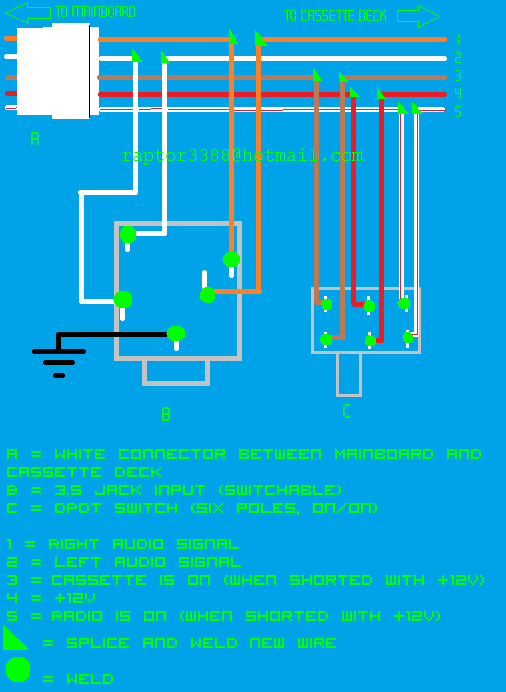
The cassette unit is plugged to the main unit with this connector:
Here's what each wire correspond to :
orange = right audio channel
blanc = left audio channel
rouge = +12V supply for the cassette unit
brown = select tape as input when shorted to +12V (red wire)
red/white = select radio as input when shorted to +12V (red wire)
The easiest would be to wire a 3.5 input to the orange and white wires with a ground somewhere. The problem is that each time you would want to plug your auxiliary device, you would have to insert a cassette or whatever non metallic thing so the unit thinks a cassette is inserted.
I don't want that, I want the signal coming from the input to replace the cassette (or radio maybe) signal when I insert a plug in.
I think I have to start with a switchable 3.5 input (5 pin), are these the same found on computer sound cards ?
Is there an electronics expert here that can explain everything for those who want to keep their original radio with a modern "touch".
Thanks
Last edited by SolarGoldRaptor; Jul 14, 2010 at 08:33 AM.
Reason: Solved
Re: How to add an auxiliary input on an original Delco unit ?
im guessing a simple 3.5 extension cable would work...split n splice the two cables inside to the left and right channel wire...there has to be a way you can jump the 12 volt to the cassette input so that it is always on...try it out...not like youll short something major out! LOL
Re: How to add an auxiliary input on an original Delco unit ?
I've been looking into this since last fall for the radio in my '85 Berlinetta. It has the 'pod'-type radio.
I've been doing electronics repair for the last 25 years. Mostly computerized display systems for aircraft cockpits. Digital, analog, thru-hole and surface mount. I've worked with them all over the years.
The best way to do this is to solder an input jack to an unused input on the multiplexer chip, then force the control lines to use that input. I found that my Berlinetta radio uses a mux chip with four inputs. Only two are used (radio, cassette). I've searched for a 3.5mm jack that would allow me to just plug-and-go, but haven't found one yet. I found them in 1/4" jacks, but I think because of their size, they're not made in 3.5mm. So that leaves an external switch to choose inputs.
I haven't looked at the regular Delco radios in other Third-Gens, but I have to think they are similar. Does anybody have a schematic? If you can email them to me, I'll see if and where an aux input could be soldered to.
Re: How to add an auxiliary input on an original Delco unit ?
That setup works, but it's for connecting a stereo input device to an old mono AM radio. It is using the same technique that the eBay guys are using. This was my first thought on how to do it, but I thought it would add too much noise to the signal from having to route the original low-level audio signal out of the box, thru a jack and then back in. Looking at the eBay setups, that is exactly what they're doing.
Re: How to add an auxiliary input on an original Delco unit ?
I've done it ! It works BUT the sound from the input is extremely low, I can barely hear a thing.
I've seen somewhere to add a 100k ohms resistor, if someone can guide me through this.
I will make a diagram to show everyone what I did.
Re: How to add an auxiliary input on an original Delco unit ?
After a lot of reading, it appears that the sound quality coming from the cassette deck is poor unless it reads a cassette. So I'm changing my plans.
The best way to do it would be to send the signal directly into the amp, to cut the radio signal.
The guys that sell those modified Delco radios are apparently doing it this way. Now we need to find out how they do it.
Now it gets a little more complicated.
Re: How to add an auxiliary input on an original Delco unit ?
Yesterday I decided to rebuild my setup all over (still with the cassette wires). I used new components, new wires, and better solders. And it works pretty darn good now !
The sound quality is excellent, I'm really surprised. I've only used two trashed Blaupunkt speakers from the late seventies, but even with those the sound is great. The equalizer works like a charm.
I'm must have messed something up though as the tape player won't work at all.
I will make a diagram for those who are interested in adding an input.
It's really easy, this is all you need :
- wires of different colours (I got mine from a trashed Peugeot 405 wiring harness)
- DPDT switch (six poles, on/on)
- 5 poles switchable jack input (the same that you find on sound card and motherboards)
- soldering iron
- solder
- electrical tape
- heat shrinking tubing (not necessary but that is much better and cleaner than tape)
- a bit of patience and care
I already had the tools, I found the components on old computer stuff, so I haven't spent a dime on this.
There must be a way to use the jack as a switch but I haven't found out how.
Re: How to add an auxiliary input on an original Delco unit ? SOLVED WITH DIAGRAM !
ok ive fried my radio, not by incorrect wiring but because i think its old. i i pushed the volume control in tape mode and it smoked and fried my radio.
Re: How to add an auxiliary input on an original Delco unit ? SOLVED WITH DIAGRAM !
Originally Posted by 58mark
I've used those... two problems with them...
first, they sound muddy, like a cassette... go figure
second, a 20 year old radio isn't likely to have the cassette desk in working order. some do, most don't
Mark, it doesn't use the (cassette player) itself; it uses the wires (power/left/rirgh channel) that go from the cassette player to the radio board harness. The cassette player is what goes bad; not whats leading out from it. the magnetic reader things give out.
trust me my cassette player doesnt work. it wont play my ***** nelson or kiss cassette but i did this yesterday morning with the parts i got from work. it works like a aftermarket head unit with a aux input. i can show you in person because your not far from me.
Re: How to add an auxiliary input on an original Delco unit ? SOLVED WITH DIAGRAM !
ive owned 4 third gens, a 95 cadillac with the delco unit, and an old cavalier. ALL of my tape decks worked perfect. my girl friend owns 2 camaros and had a firebird, al of her tape decks worked
Re: How to add an auxiliary input on an original Delco unit ? SOLVED WITH DIAGRAM !
Looks like I have a project to play with next week. Probably take the complete tape section out, make an abs plate to cover the hole and mount the jack. Heck, may just gut a cell phone charger and add a usb charge port.
Re: How to add an auxiliary input on an original Delco unit ? SOLVED WITH DIAGRAM !
Originally Posted by dcil
Looks like I have a project to play with next week. Probably take the complete tape section out, make an abs plate to cover the hole and mount the jack. Heck, may just gut a cell phone charger and add a usb charge port.
i just did that actually, i added a dual usb port on the plastice above my ac controlls.
sense i work at raadio shack, i took apart a 1.2 amp usb car charger, wired up a fuse amd did some plactic cutting,
Re: How to add an auxiliary input on an original Delco unit ? SOLVED !
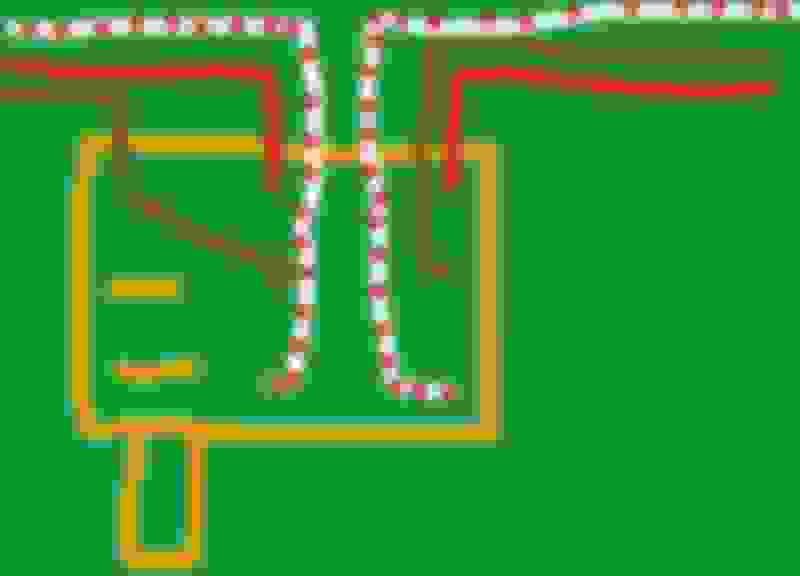
I'm no expert, and I know this is an old thread, but I just wanted to see if this makes sense to anyone else. From what I can see, you installed a system with this diagram and then the cassette player stopped working all together. It seems the reason is that you're cutting all power from the Casstette deck with this configuration. Because the cassette deck has it's own set of built in switches to determine the selected audio source, it would be a good idea to remove them from the mix when selecting an aux device to ensure that nothing has a chance to mess up the radio itself. Your configuration does that, but then never has a way to restore that back to the cassette deck. Here's how I would wire it. You'll need a 9 pole switch for it. The AUX input line would still connect like you have it but I think the switch should look like this picture
. I"M NOT A GRAPHIC ARTIST!!!!! I"M NOT EVEN CLOSE!!!! But, I think you can see where I was going with this. What it does, with the switch in the displayed left position, all circuits are broken other than the ones needed to select the "tape"source to activate the AUX input. In the right position, it establishes all of the connections as they were before modifying. This will them allow the Cassette deck to get power and also allow it to select which audio source to use. Please don't hesitate to let me know if anyone finds any errors in this. It's late and I'm just doing a little research about building an onboard computer for my truck.
Re: How to add an auxiliary input on an original Delco unit ? SOLVED !
Also, I have a question... being that you're removing the power from the cassette deck, this should also kill the EQ built into the cassette player that runs the whole radio. Is this correct? Does that radio in question have the built in EQ like mine does? If so, this could be a problem. If that's the case, then we would probably need to solder the leads from the AUX input right into the audio leads in the cassette deck and then use a 3 pole switch wired straight into the cassette deck to select between audio sources and FIND and REMOVE the switch as it exists in the cassette deck so that you will have to manually switch between devices rather than risk a short or over powering the 12vdc line going back to the main unit. If that happens, you'll get a smoking radio and just wind up having to replace it anyway.
Re: How to add an auxiliary input on an original Delco unit ? SOLVED WITH DIAGRAM !
Originally Posted by dcil
Could use the switching jack to trigger a micro relay to bridge the brown and red wires.
But you'll also have to have something to BREAK the white and red wires, otherwise, the system will fault and both devices will be selected. I think this will kill the radio.
Re: How to add an auxiliary input on an original Delco unit ? SOLVED !
Originally Posted by jim.miller.bpi
I'm no expert, and I know this is an old thread, but I just wanted to see if this makes sense to anyone else. From what I can see, you installed a system with this diagram and then the cassette player stopped working all together. It seems the reason is that you're cutting all power from the Casstette deck with this configuration. Because the cassette deck has it's own set of built in switches to determine the selected audio source, it would be a good idea to remove them from the mix when selecting an aux device to ensure that nothing has a chance to mess up the radio itself. Your configuration does that, but then never has a way to restore that back to the cassette deck. Here's how I would wire it. You'll need a 9 pole switch for it. The AUX input line would still connect like you have it but I think the switch should look like this picture
. I"M NOT A GRAPHIC ARTIST!!!!! I"M NOT EVEN CLOSE!!!! But, I think you can see where I was going with this. What it does, with the switch in the displayed left position, all circuits are broken other than the ones needed to select the "tape"source to activate the AUX input. In the right position, it establishes all of the connections as they were before modifying. This will them allow the Cassette deck to get power and also allow it to select which audio source to use. Please don't hesitate to let me know if anyone finds any errors in this. It's late and I'm just doing a little research about building an onboard computer for my truck.
I actually haven't tried with a cassette...but it works perfectly with either the AUX or the radio, even though, being in Europe, most US channels won't work. If anyone knows how to use odd and even numbers channels, that would be great. I use the radio all the time when driving and I must set it to a high volume because of the various noises my T/A makes.
Re: How to add an auxiliary input on an original Delco unit ?
Hello, Dave. I also have a 1985 Berlinetta like yours and I have some bad contact on my radio. Looking here in forums by schematic, I found your post. From what I understand you have the schematic of the Delco. Can you give me a copy? Thanks for your help in keeping our model working!
Re: How to add an auxiliary input on an original Delco unit ? SOLVED WITH DIAGRAM !
Marcus,
I had the schematic for the Berlinetta 'Pod' radio, not the regular radio installed in the dash, you put this in a thread for regular Delco radios.
I say had, because I haven't looked at it for years, and I'm not sure if I have it anymore.
What exactly do you mean when you say you have a 'bad contact'?
Re: How to add an auxiliary input on an original Delco unit ? SOLVED WITH DIAGRAM !
Hi Dave,
First of all, thanks for the quick reply!
I have the Berlinetta "Pod" Radio... For some time he has problems in the audio, that goes back and forth, sometimes a channel, sometimes another. I already checked the connectors but I would like to have the schematic to follow the signal with Oscilloscope. If you can find it, or know of someone you may have, thank you very much. Sorry for bad English...
Re: How to add an auxiliary input on an original Delco unit ? SOLVED WITH DIAGRAM !
Speaker problems on 1 (or more) of the 4 channels is usually caused by a problem inside the Receiver. If your interested in obtaining a replacement Berlinetta Receiver WITH the AUX jack installed on a cable,..... it's $145 + shipping.
** Price in USD for the 84-85 style Berlinetta EQ Receiver with AUX.
Re: How to add an auxiliary input on an original Delco unit ? SOLVED WITH DIAGRAM !
Originally Posted by MarcusMandarino
Hi Dave,
First of all, thanks for the quick reply!
I have the Berlinetta "Pod" Radio... For some time he has problems in the audio, that goes back and forth, sometimes a channel, sometimes another. I already checked the connectors but I would like to have the schematic to follow the signal with Oscilloscope. If you can find it, or know of someone you may have, thank you very much. Sorry for bad English...
Marcus,
I'll try looking for the schematics. In the mean time... It sounds like you have access to a scope and know how to use it. Have you tried to just monitor the outputs from the amplifer box. That would eliminate the radio as the problem. Try to bypass the speaker wires by jumping a short cable from the box to a loose speaker. I've found that most of my audio problems are with the speaker wiring being intermittent. Body schematics are in back of the factory manual.
John from RI, would you be able to help Marcus with tracing the outputs inside the box?
Re: How to add an auxiliary input on an original Delco unit ? SOLVED WITH DIAGRAM !
Dave,
The problem seems to be in the preamp area. If I give a little hit on the receiver unit the sound will come back ... Turning it on and off too. Now the radio is mounted on the car (and you know how hard it is to take out ...) and I just want to take it out when I get the schematic. I have the technical skills to fix this. John suggested replacing the unit but it's a little tricky to do this because I'm in Brazil (customs & costs). So I'd rather wait for the possibility of getting the schematic.
Thanks,
Marcus
Re: How to add an auxiliary input on an original Delco unit ? SOLVED WITH DIAGRAM !
Marcus; I got your E-Mail but will reply here........
I do not have the radio schematics that you are looking for. Another member here 'hooked me up' with some radio schematics probably back around 2002 or so. A couple years later I mailed them to someone else after receiving a $50 deposit that was to be returned when the guy was done using the schematics and sent them back to me,..... then, I never heard back from him. 25-30 years ago when I was used to pay a repair shop to fix my Berlinetta cassette decks that repair tech would always do some additional work inside the Receivers I gave him to resolve/avoid speaker channel problems. I couldn't tell you what he did - just that the bad speaker channel problem is (usually) caused by a problem in the Receiver itself.
Shipping to Brazil = $73. I have NO IDEA about Brazil customs,............. it would be up to you to figure that out.
P.S. Only takes about 5 minutes to remove the entire radio from the console; why not pull it out, set it up on a bench, hook up power/ground + a couple speakers,... then start probing !?!?
Re: How to add an auxiliary input on an original Delco unit ? SOLVED WITH DIAGRAM !
Hi John,
Thank you for your feedback. The problem with customs is a bit more complicated ... I can not import used items. Although you could pay 60% on the FOB cost (item + freight). So I'll wait for a possible trip to the USA next September, and then I can bring it in my luggage. The price is $ 145, no core? In this case, I'll talk to you again. Until then I'll do what you said: get out of the car, setup it on a bench and try to locate the problem.
Thank you for your kindness!
Marcus
Re: How to add an auxiliary input on an original Delco unit ? SOLVED WITH DIAGRAM !
No Sweat Marcus !!
I know that all countries handle customs different and I'm not well versed on international customs practices of any country other than my own.
No; No core needed. Also; I don't normally install the AUX jack on a radio until someone requests that type of radio with the AUX. A LOT of guys simply want a stock replacement radio without any mods. If you *might* be interested in one of these Receivers with the AUX,........... just send me a message in advance of your trip to the US so I can have one prepared & ready to go for Ya'.
Re: How to add an auxiliary input on an original Delco unit ? SOLVED WITH DIAGRAM !
Originally Posted by John in RI
Marcus; I got your E-Mail but will reply here........
I do not have the radio schematics that you are looking for. Another member here 'hooked me up' with some radio schematics probably back around 2002 or so. A couple years later I mailed them to someone else after receiving a $50 deposit that was to be returned when the guy was done using the schematics and sent them back to me,..... then, I never heard back from him. 25-30 years ago when I was used to pay a repair shop to fix my Berlinetta cassette decks that repair tech would always do some additional work inside the Receivers I gave him to resolve/avoid speaker channel problems. I couldn't tell you what he did - just that the bad speaker channel problem is (usually) caused by a problem in the Receiver itself.
Shipping to Brazil = $73. I have NO IDEA about Brazil customs,............. it would be up to you to figure that out.
P.S. Only takes about 5 minutes to remove the entire radio from the console; why not pull it out, set it up on a bench, hook up power/ground + a couple speakers,... then start probing !?!?
Wow, has it been that long....?! Yeah, sorry to say that was me. That was a real busy time of my life, no excuse tho. I'll do what I can to find the schematics and get them back to you if you still want them. I'll also send you a suprise that I hope will make up for it a bit.
If you don't mind me asking, how are you hooking up your aux in cable and how do you keep the radio from playing over it?
Re: How to add an auxiliary input on an original Delco unit ? SOLVED WITH DIAGRAM !
Well,... maybe it was around 2004 ?!?!?! And maybe it was $40,... or was it $50 ?!?!? It's a small world,... ain't it Marcus !!
I'm a novice - maybe an amateur at this point - when it comes to radio repair. I had schematics available to me when I figured out the Berlinetta AUX that I no longer have access to. While I've shared just about everything I've ever learned about Thirdgens on this site and others,.. how to install the AUX on a Berlinetta head unit is going to be 1 secret that I keep to myself. I can only hope that you can relate.
Re: How to add an auxiliary input on an original Delco unit ? SOLVED WITH DIAGRAM !
Hi John!
I fully understand your point and I support it. I'm not looking for the AUX input ... I'm just trying to get the radio to work! So, I keep looking for the schematic. And, I'm still interested in a radio spare, so when I travel to US, I'll pick you up.
Thank you.
Marcus
Re: How to add an auxiliary input on an original Delco unit ? SOLVED WITH DIAGRAM !
Although many of us aren't super old yet
These days ( my youngest son gets is HS diploma tomorrow ) I feel the same way about myself as I do about Mean Green,............. Hard to believe, but this thing is an Antique !!
Re: How to add an auxiliary input on an original Delco unit ? SOLVED WITH DIAGRAM !
Originally Posted by MarcusMandarino
Hi John!
I fully understand your point and I support it. I'm not looking for the AUX input ... I'm just trying to get the radio to work! So, I keep looking for the schematic. And, I'm still interested in a radio spare, so when I travel to US, I'll pick you up.
Thank you.
Marcus
Re: How to add an auxiliary input on an original Delco unit ? SOLVED WITH DIAGRAM !
The schematic / images are for the regular 'Delco 2000' radio AMP circuit board but the Berlinetta head unit is a different beast altogether. I've got that link saved for "someday"........might try to modify a regular radio by adding the pre-amp outputs in the future to see how it works out. Not in a big hurry cause' I've got a BOSE system in everything I drive but I'll give it a try (someday !)