


Page layout problem


Thread Starter
Supreme Member
iTrader: (3)
Joined: Jul 2004
Posts: 2,989
Likes: 9
Car: '91 Z28 convertible
Engine: TPI
Transmission: T5
Axle/Gears: 3.27 posi disc
Page layout problem
Today, I noticed a problem in the page layout.
It shows good while the page is loading but toward the end of the load, the layout changes and shrinks the borders to only a few hundred pixels.
I haven't changed anything on my computer recently, it worked yesterday but looks like this today.
I am attaching a screen shot.
Lou
It shows good while the page is loading but toward the end of the load, the layout changes and shrinks the borders to only a few hundred pixels.
I haven't changed anything on my computer recently, it worked yesterday but looks like this today.
I am attaching a screen shot.
Lou


Re: Page layout problem
I just viewed the same thread you did in the South Central forum with the following 3 browsers and, as you can see, I'm not seeing the issue:
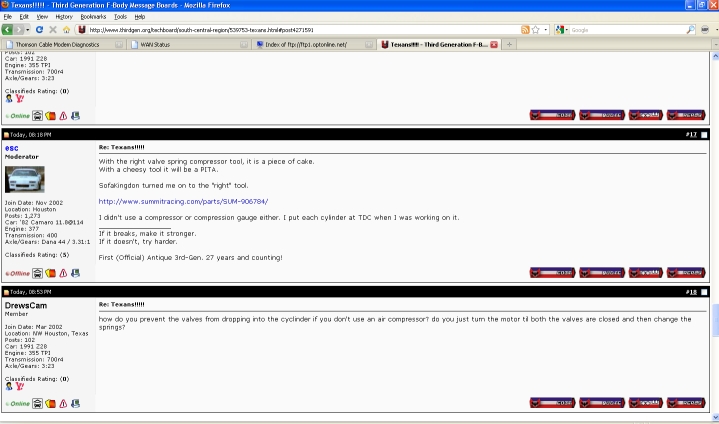
FireFox
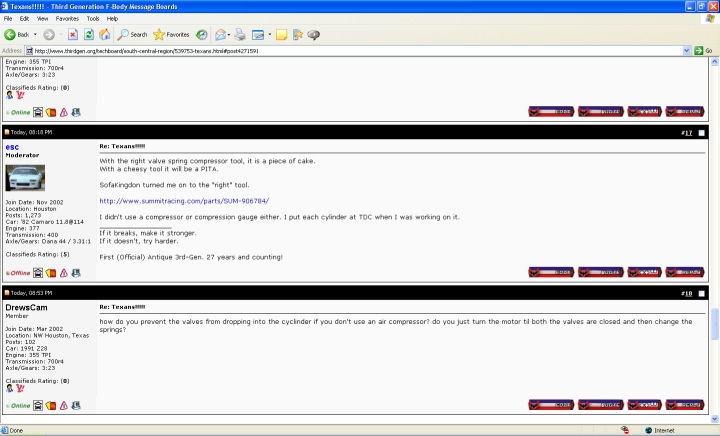
IE
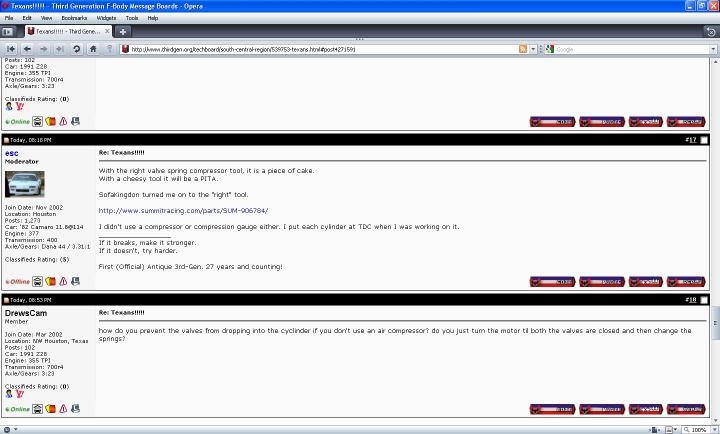
Opera
FireFox
IE
Opera
Today, I noticed a problem in the page layout.
It shows good while the page is loading but toward the end of the load, the layout changes and shrinks the borders to only a few hundred pixels.
I haven't changed anything on my computer recently, it worked yesterday but looks like this today.
I am attaching a screen shot.
Lou
It shows good while the page is loading but toward the end of the load, the layout changes and shrinks the borders to only a few hundred pixels.
I haven't changed anything on my computer recently, it worked yesterday but looks like this today.
I am attaching a screen shot.
Lou
Thread Starter
Supreme Member
iTrader: (3)
Joined: Jul 2004
Posts: 2,989
Likes: 9
Car: '91 Z28 convertible
Engine: TPI
Transmission: T5
Axle/Gears: 3.27 posi disc
Re: Page layout problem
I cleared out the cache, rebooted, checked that no strange styles are turned on in the browser but I can't find anything that can be causing this on my side. I checked about a dozen other forum websites and don't see the problem there, only TGO exhibits this behavior. I haven't seen it shrink the posts like that before and I've been a member for years. This sure is a first.
Did the default stylesheet change at all?
I am also attaching the HTML source for this thread page, hopefully it will tell you something.
Lou
Did the default stylesheet change at all?
I am also attaching the HTML source for this thread page, hopefully it will tell you something.
Lou
Re: Page layout problem
What browser version are you using? I see it's Opera but not sure which version. My Opera, FireFox and IE are all showing fine - as you can see above. Makes me suspect it's an older version that may not like a recent change as my Opera is the newest version (10).
I cleared out the cache, rebooted, checked that no strange styles are turned on in the browser but I can't find anything that can be causing this on my side. I checked about a dozen other forum websites and don't see the problem there, only TGO exhibits this behavior. I haven't seen it shrink the posts like that before and I've been a member for years. This sure is a first.
Did the default stylesheet change at all?
I am also attaching the HTML source for this thread page, hopefully it will tell you something.
Lou
Did the default stylesheet change at all?
I am also attaching the HTML source for this thread page, hopefully it will tell you something.
Lou
Thread Starter
Supreme Member
iTrader: (3)
Joined: Jul 2004
Posts: 2,989
Likes: 9
Car: '91 Z28 convertible
Engine: TPI
Transmission: T5
Axle/Gears: 3.27 posi disc
Re: Page layout problem
I use a 9.2x version, at work and home. Same result in both places.
If you guys added a formatting feature that's supported only in the newest browsers, it will affect a lot of users because not everybody upgrades to the newest versions instantly.
If I get some time today, I'll install Opera 10 on a test machine to see whether it resolves the problem and let you know.
Lou
If you guys added a formatting feature that's supported only in the newest browsers, it will affect a lot of users because not everybody upgrades to the newest versions instantly.
If I get some time today, I'll install Opera 10 on a test machine to see whether it resolves the problem and let you know.
Lou
Thread Starter
Supreme Member
iTrader: (3)
Joined: Jul 2004
Posts: 2,989
Likes: 9
Car: '91 Z28 convertible
Engine: TPI
Transmission: T5
Axle/Gears: 3.27 posi disc
Re: Page layout problem
Ok, tested Opera 10 and it does not have this problem.
However, it still shows advertisements on the bottom of the page stacked vertically, taking up two extra pages.
I don't believe it's a good idea to limit a webpage to be shown only in the latest browser version that came out just two days ago. But that's just my crazy personal belief.
Lou
However, it still shows advertisements on the bottom of the page stacked vertically, taking up two extra pages.
I don't believe it's a good idea to limit a webpage to be shown only in the latest browser version that came out just two days ago. But that's just my crazy personal belief.
Lou
Re: Page layout problem
A few things. First, you're running an outdated version of Opera as there has been numerous upgrades between your version and the newest version.
In addition, I just installed 9.6 (still rather old) and it parsed/displayed just fine as you can see:
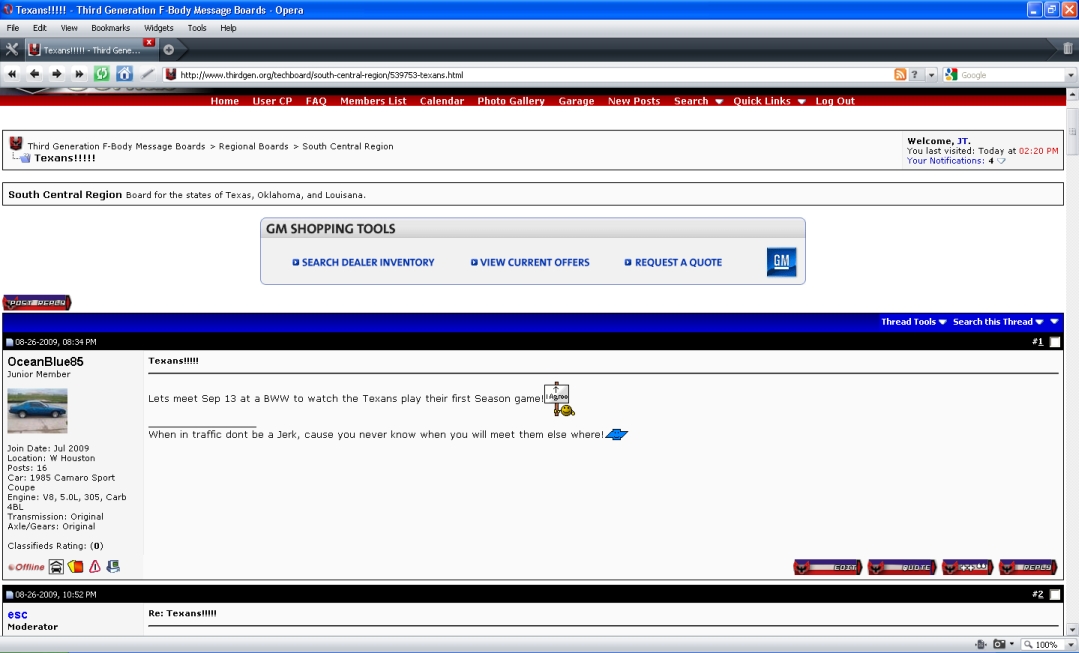
Therefore, you are not forced to running the latest Opera as 9.6 appears to be fine (and I'm sure other versions are as well). It's usually not recommended to run outdated software on the Internet when such security risks are found and fixed pretty much non-stop.
I will say this, last I checked, Opera wasn't widely used on this site so it likely does not impact a lot of users. As you can see from the screen shots I posted above, the major browsers (I.E., FireFox) display normally and the newest Opera displays correctly. It's not always easy to make every single browser, AND all versions, display as intended. There's usually a cut-off period in any support department as to how long a product will be maintained and supported when there's X amount of newer versions/revisions.
I will also add that the change made to the template (actually a plugin) was not my doing or work, so I'm not defending myself or my work here.
In addition, I just installed 9.6 (still rather old) and it parsed/displayed just fine as you can see:
Therefore, you are not forced to running the latest Opera as 9.6 appears to be fine (and I'm sure other versions are as well). It's usually not recommended to run outdated software on the Internet when such security risks are found and fixed pretty much non-stop.
I will say this, last I checked, Opera wasn't widely used on this site so it likely does not impact a lot of users. As you can see from the screen shots I posted above, the major browsers (I.E., FireFox) display normally and the newest Opera displays correctly. It's not always easy to make every single browser, AND all versions, display as intended. There's usually a cut-off period in any support department as to how long a product will be maintained and supported when there's X amount of newer versions/revisions.
I will also add that the change made to the template (actually a plugin) was not my doing or work, so I'm not defending myself or my work here.
Ok, tested Opera 10 and it does not have this problem.
However, it still shows advertisements on the bottom of the page stacked vertically, taking up two extra pages.
I don't believe it's a good idea to limit a webpage to be shown only in the latest browser version that came out just two days ago. But that's just my crazy personal belief.
Lou
However, it still shows advertisements on the bottom of the page stacked vertically, taking up two extra pages.
I don't believe it's a good idea to limit a webpage to be shown only in the latest browser version that came out just two days ago. But that's just my crazy personal belief.
Lou
Trending Topics
Thread Starter
Supreme Member
iTrader: (3)
Joined: Jul 2004
Posts: 2,989
Likes: 9
Car: '91 Z28 convertible
Engine: TPI
Transmission: T5
Axle/Gears: 3.27 posi disc
Re: Page layout problem
It seems to be working correctly again. Thank you for fixing it, whoever is responsible. 
I tried the new 10.0 version (as I tried the previous 9.5 version) but had to revert back to the "gool ole" 9.2x because the new versions are just plain bad. Incorrect behavior, not honoring HTML properly, it just goes against all logic. I am surprised that it was even released with such bugs. So I'm sticking with my "old" version which at least works.
Thanks
Lou
I tried the new 10.0 version (as I tried the previous 9.5 version) but had to revert back to the "gool ole" 9.2x because the new versions are just plain bad. Incorrect behavior, not honoring HTML properly, it just goes against all logic. I am surprised that it was even released with such bugs. So I'm sticking with my "old" version which at least works.
Thanks
Lou

Thread
Thread Starter
Forum
Replies
Last Post
Hotrodboba400
Firebirds for Sale
3
Dec 10, 2019 07:07 PM
