


engine codes


Thread Starter
Senior Member
Joined: Jul 2000
Posts: 502
Likes: 0
From: pittsburgh,pa, us
engine codes
i know this is a stupid question for you guys, but take into consideration that i am new to mechanical things on a car, but trying and still learing, but how do you get your codes from your cars?

Senior Member
iTrader: (1)
Joined: Feb 2000
Posts: 720
Likes: 0
From: Shakopee, Mn
Car: 89 Iroc
Engine: 305TPI
Transmission: T5
I will try my best but I am hoping that someone will resuce me if I explain it wrong.
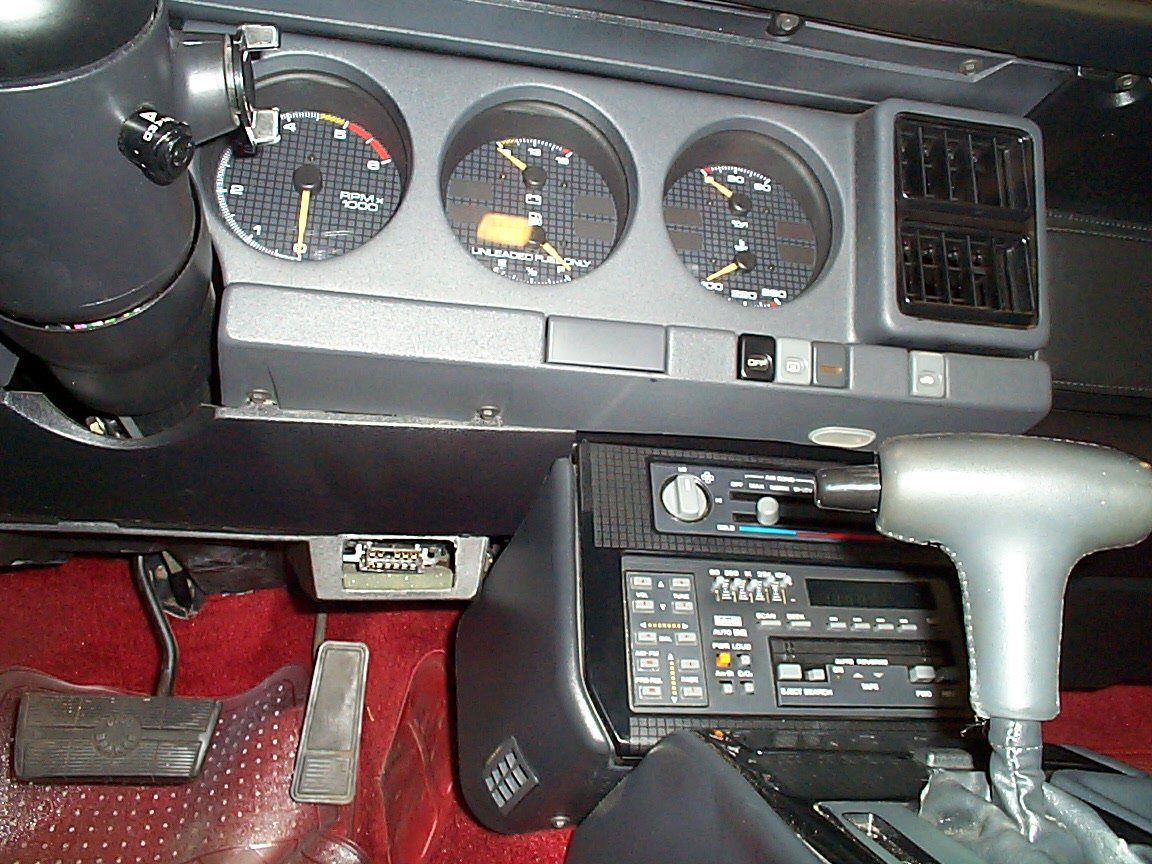
Remove the black cover to the "computer" (i think it is called the aldl sorry I know what the stuff is but not called)under the dash and take a paper clip straighten it out then curve it around to make a u shape. After you do that put one end of the clip in the top right spot of the computer then take and put the second side of the clip in the spot just to the left of it. BTW the car should be in the on position not started but turned one click. Hold it there till SES light flashes. It will flash once then pause then flash twice and pause. It will do that 3 times then if you are throwing a code it will flash a different number. For instance I now have a code 45 which it flashed four times then paused then flashed five times. Hope that helps any other questions just ask.
Remove the black cover to the "computer" (i think it is called the aldl sorry I know what the stuff is but not called)under the dash and take a paper clip straighten it out then curve it around to make a u shape. After you do that put one end of the clip in the top right spot of the computer then take and put the second side of the clip in the spot just to the left of it. BTW the car should be in the on position not started but turned one click. Hold it there till SES light flashes. It will flash once then pause then flash twice and pause. It will do that 3 times then if you are throwing a code it will flash a different number. For instance I now have a code 45 which it flashed four times then paused then flashed five times. Hope that helps any other questions just ask.

Member
Joined: Jan 2000
Posts: 384
Likes: 0
From: Pt. Pleasant, WV (Home of the Mothman!)
The ALDL is under your dash by the console.
Besure you install the paper clip into ports A(ground)and B(system diagnostics).After you have the clip in turn the key to run(NOT START).After the computer has flashed the code it will flash "12" once more.Showing it has no more codes.Turn the key off then remove the clip.
------------------

[This message has been edited by Kevin S (edited October 13, 2000).]
Besure you install the paper clip into ports A(ground)and B(system diagnostics).After you have the clip in turn the key to run(NOT START).After the computer has flashed the code it will flash "12" once more.Showing it has no more codes.Turn the key off then remove the clip.
------------------
[This message has been edited by Kevin S (edited October 13, 2000).]

Moderator


Joined: Jan 2000
Posts: 19,669
Likes: 314
Jig,
Check this link for code interpretations and procedure:
GMErrorCodes.pdf.
You'll need Adobe Acrobat Reader to view/print the file. (See link below)
The ALDL is located here:
------------------
Later,
Vader
------------------
"Make Me Bad"
Adobe Acrobat Reader 4.0
Check this link for code interpretations and procedure:
GMErrorCodes.pdf.
You'll need Adobe Acrobat Reader to view/print the file. (See link below)
The ALDL is located here:
------------------
Later,
Vader
------------------
"Make Me Bad"
Adobe Acrobat Reader 4.0
Last edited by Vader; Mar 31, 2018 at 09:19 PM. Reason: Updated Links

Thread
Thread Starter
Forum
Replies
Last Post