


Need help getting Ostrich 2.0 emulator to work


Thread Starter
Member
Joined: Mar 2005
Posts: 396
Likes: 0
Need help getting Ostrich 2.0 emulator to work
Hoping someone here can help me out. Haven't been on the forum for years and no longer own a third gen, but I remember this forum having a tonne of knowledgeable people when it came to this kind of stuff.
Hopefully, someone hear can suggest something that will solve my problem since this is a subject I have ZERO knowledge on, or experience with.
I recently purchased a supercharger system for my 1992 LT1 Corvette.
Though it hasn't arrived just yet, the tuning hardware/software that comes with it, has.
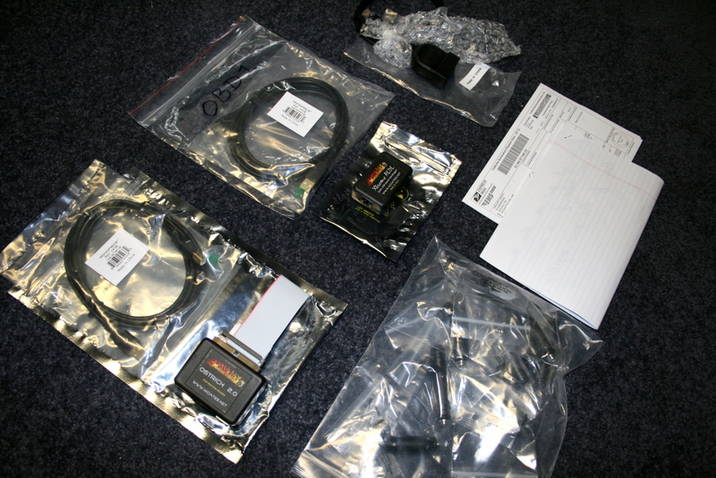
I've got a Moates Ostrich 2.0 emulator. "G1" adapter and a Moates "ALDL USB data logger" - along with the necessary cables.
Below is a picture of the hardware that I purchased and how it's connected to my laptop (picture was taken before I installed it in the car but it gives you an idea of the way it's all hooked up)

The supercharger system I purchased comes with 63# injectors but before I install them, I've been given a new program (already pre- loaded in the Ostrich) to test on the car. I'm supposed to check the fuel trim's with the new tune and report back the findings. (Mind you the tune is not for the supercharger or larger injectors yet, but to modify my current fuel trims as a test).
Here's where things get confusing and I really could use some help 'cause I know NOTHING about computers or tuning.
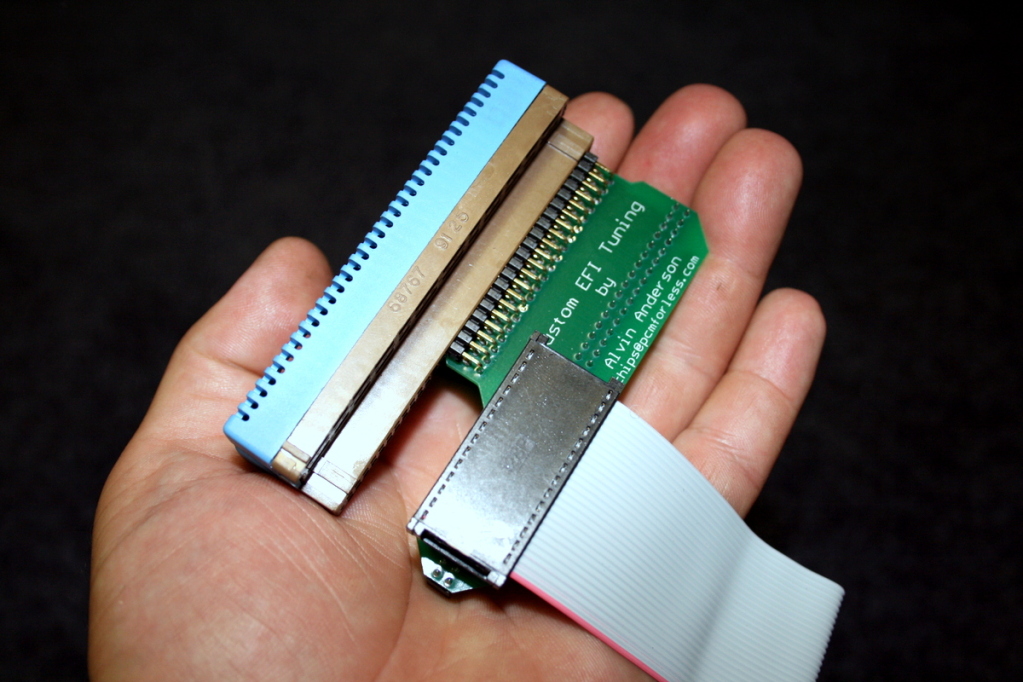
I plugged the Ostrich into the "G1" adapter, which is connected to the factory Memcal pack and plugged the assembly into the ECM as pictured below.
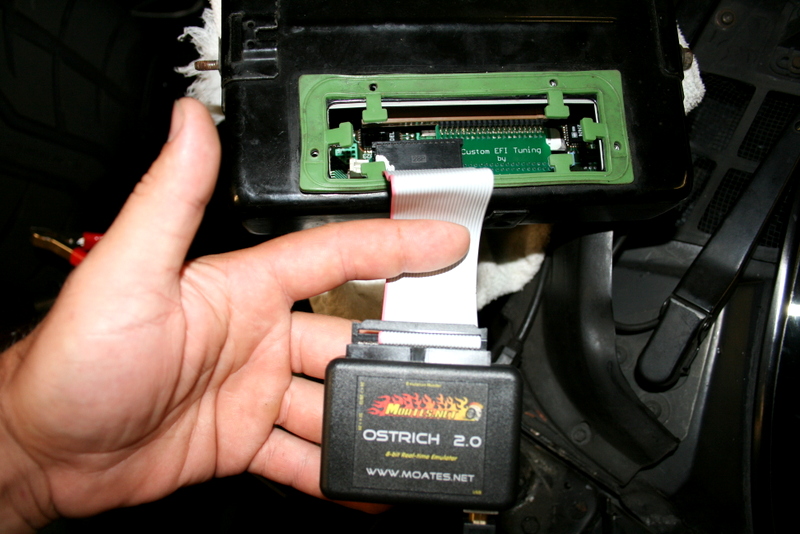
When the car started up when I turned the key, I breathed a sigh of relief and thought the install went okay, but within seconds, both cooling fans came on and the "SERVICE ENGINE SOON" lit up on the dash.

I could also smell a definite increase in fuel through the exhaust.
Looking over at my laptop which had both TunerPro RT and C.A.T.S. RT tuner programs installed and running, there was no sign of activity on either one. Something along the lines of "no emulator found/no signal" mentioned on both programs.
I'm at a loss. Did I install something wrong?
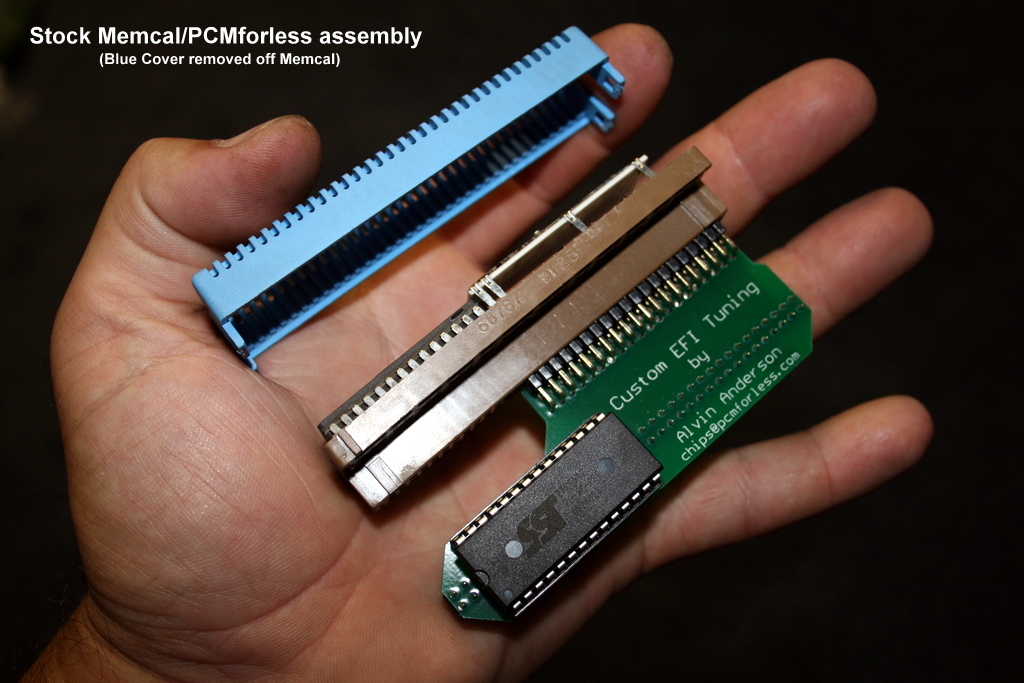
For the record (just in case it makes any difference) the "G1" (that's what I've been told is the proper name for it) had a chip custom tuned by PCMforless originally. I was told that I had to first gently pull off Alvin's chip and then plug the connector at the end of the ribbon cable that comes off the Ostrich unit. That's what I did and made sure that all the pins in the connector were straight before I pushed down to make the connection.
Below is a picture of the PCMforless "G1" with the original chip (custom tune) that came with it before it was removed and the Ostrich hooked up in it's place. (3rd and 4th pictures in this thread).
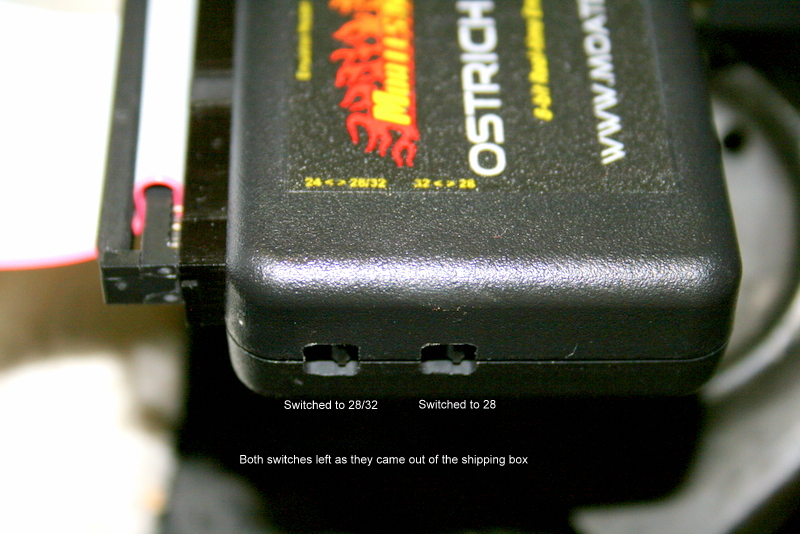
Finally, the Ostrich Emulator has two user-selectable positions which I left alone the way they came in the box. First switch set to 28/32. Second switch, to 28.
Being a '92, the 'Vette is powered by an LT1, just in case anyone was wondering.
I'm hoping this is something simple like me not hooking something up properly. Hopefully somebody can tell from the pictures provided.
Hopefully, someone hear can suggest something that will solve my problem since this is a subject I have ZERO knowledge on, or experience with.
I recently purchased a supercharger system for my 1992 LT1 Corvette.
Though it hasn't arrived just yet, the tuning hardware/software that comes with it, has.
I've got a Moates Ostrich 2.0 emulator. "G1" adapter and a Moates "ALDL USB data logger" - along with the necessary cables.
Below is a picture of the hardware that I purchased and how it's connected to my laptop (picture was taken before I installed it in the car but it gives you an idea of the way it's all hooked up)
The supercharger system I purchased comes with 63# injectors but before I install them, I've been given a new program (already pre- loaded in the Ostrich) to test on the car. I'm supposed to check the fuel trim's with the new tune and report back the findings. (Mind you the tune is not for the supercharger or larger injectors yet, but to modify my current fuel trims as a test).
Here's where things get confusing and I really could use some help 'cause I know NOTHING about computers or tuning.
I plugged the Ostrich into the "G1" adapter, which is connected to the factory Memcal pack and plugged the assembly into the ECM as pictured below.
When the car started up when I turned the key, I breathed a sigh of relief and thought the install went okay, but within seconds, both cooling fans came on and the "SERVICE ENGINE SOON" lit up on the dash.
I could also smell a definite increase in fuel through the exhaust.
Looking over at my laptop which had both TunerPro RT and C.A.T.S. RT tuner programs installed and running, there was no sign of activity on either one. Something along the lines of "no emulator found/no signal" mentioned on both programs.
I'm at a loss. Did I install something wrong?
For the record (just in case it makes any difference) the "G1" (that's what I've been told is the proper name for it) had a chip custom tuned by PCMforless originally. I was told that I had to first gently pull off Alvin's chip and then plug the connector at the end of the ribbon cable that comes off the Ostrich unit. That's what I did and made sure that all the pins in the connector were straight before I pushed down to make the connection.
Below is a picture of the PCMforless "G1" with the original chip (custom tune) that came with it before it was removed and the Ostrich hooked up in it's place. (3rd and 4th pictures in this thread).
Finally, the Ostrich Emulator has two user-selectable positions which I left alone the way they came in the box. First switch set to 28/32. Second switch, to 28.
Being a '92, the 'Vette is powered by an LT1, just in case anyone was wondering.
I'm hoping this is something simple like me not hooking something up properly. Hopefully somebody can tell from the pictures provided.
Last edited by LT1FUN; Aug 11, 2012 at 09:57 PM.


Joined: Mar 2006
Posts: 4,370
Likes: 19
Car: 1973 Datsun 240Z/ 1985 S-15 Jimmy
Engine: Turbo LX9/To be decided
Transmission: 5-speed/T-5
Axle/Gears: R200 3.90/7.5" 3.73
Re: Need help getting Ostrich 2.0 emulator to work
Open up you tuning program and "download contents from emulator". Save it and go through that BIN using the proper definition file, if memory serves, it should be $8D.
It sounds as though you don't have a proper BIN file loaded to the Ostrich.
How does the car run with the EEPROM in the G1?
It sounds as though you don't have a proper BIN file loaded to the Ostrich.
How does the car run with the EEPROM in the G1?
Thread Starter
Member
Joined: Mar 2005
Posts: 396
Likes: 0
Re: Need help getting Ostrich 2.0 emulator to work
Open up you tuning program and "download contents from emulator". Save it and go through that BIN using the proper definition file, if memory serves, it should be $8D.
It sounds as though you don't have a proper BIN file loaded to the Ostrich.
How does the car run with the EEPROM in the G1?
It sounds as though you don't have a proper BIN file loaded to the Ostrich.
How does the car run with the EEPROM in the G1?
Please be patient with me. When I say I know nothing about computers/tuning, I really mean it. This stuff is all chinese to me.

By "EEPROM" do you mean the chip Alvin from PCMforless Programmed which was removed from the G1?
If so, the car ran fantastic with it. Been running it for a couple years now without issue. Mind you the car only has a few bolt-ons but combined with Alvin's tune, the car has run a best of 12.9 in the quarter.
As for downloading the "contents from the emulator" - as I mentioned earlier, there is no activity at all in either C.A.T.S. RT tuner program or TunerPro RT. Both say something like "no emulator detected/no signal" or something along those lines.
It's as if there's no communication at all between the cars computer and the laptop even though everything's plugged in.
I'm going to hook up my trusty old Snap-on scanner tomorrow and see if any codes pop up (I'm assuming there will since the engine light came on).
Also going to plug the PCMforless chip back into the G1 and see if that eliminates the problem. If it does, that leaves the Ostrich or the way it's been connected, as the cause of the problem.
Last edited by LT1FUN; Aug 11, 2012 at 10:18 PM.
Joined: Mar 2006
Posts: 4,370
Likes: 19
Car: 1973 Datsun 240Z/ 1985 S-15 Jimmy
Engine: Turbo LX9/To be decided
Transmission: 5-speed/T-5
Axle/Gears: R200 3.90/7.5" 3.73
Re: Need help getting Ostrich 2.0 emulator to work
Yes, the chip, EEPROM.
Have you installed the drivers for the Moates equipment?
Have you installed the drivers for the Moates equipment?
Thread Starter
Member
Joined: Mar 2005
Posts: 396
Likes: 0
Re: Need help getting Ostrich 2.0 emulator to work
Bit of an update.
I checked for codes using my scanner and picked up a "Quad Driver Module 1 Fault 26".
I went ahead and downloaded drivers for TunerPro and C.A.T.S. and installed them manually myself. Tried once again to run my laptop plugged into the car and still no-go. I looked through every menu option available on BOTH programs, and wasn't able to find any setting out of place. (Not that I'd know a wrong setting if I looked at it, but still looked for any obvious "on/off" settings
 )
)Neither program shows any sign of activity with the car running. No numbers, no graph's no blinking lights nothing at all.
Same message on both which is that no emulator can be found/failure to connect bla, bla, bla.
So I pulled out the Ostrich unit and inspected the pins on the connector to see if I somehow damaged any of them during install. Nope. Nothing was bent/damaged.
Plugged my old chip (by PCMforless) back into the G1. Cleared the trouble code from the system with my scanner, and started the car up again.
No more "Service Engine Soon" light. No rich smell in the exhaust. All is well again.
For the hell of it, I tried using both programs again to see if either of them would do anything with the PCMforless chip back on the car and still nothing.
It's as if the laptop is receiving no signal at all from the computer.
There must be some setting within the menu options of these programs that's preventing them from working the way they should but I don't know what it is.
On the bright side, now that the car's got the PCMforless chip back in it and is running fine again, I at least know I didn't mess up the computer or something when I plugged in the Ostrich. I was worried I damaged something on the car. That's a relief in itself.
Still stuck though and don't know where to go from here...
Joined: Mar 2006
Posts: 4,370
Likes: 19
Car: 1973 Datsun 240Z/ 1985 S-15 Jimmy
Engine: Turbo LX9/To be decided
Transmission: 5-speed/T-5
Axle/Gears: R200 3.90/7.5" 3.73
Re: Need help getting Ostrich 2.0 emulator to work
Let step back for a minute.
Ok, when you plug in either device to the laptop, does Windows recognize them? Do you get the chime that indicates this? There are FTDI drivers needed for the Moates equipment, I'm not aware of an "Tuner Pro drivers", What did you download there?
What Operating system are you using?
In Tuner Pro, have you set up the com port for datalogging? It's under Tools > Preferences > Data Acq./Emulation. Have you loaded the proper ADX/ADS and XDF files? You can find which port is being used for the Xtreme ALDL in the laptop's device manager, if you have multiple choices in the Tuner Pro set-up to choose from.
I haven't used Tuner Cats so I can't help you with that one.
I forgot to mention that the switches on the Ostrich are set up correctly.
Ok, when you plug in either device to the laptop, does Windows recognize them? Do you get the chime that indicates this? There are FTDI drivers needed for the Moates equipment, I'm not aware of an "Tuner Pro drivers", What did you download there?
What Operating system are you using?
In Tuner Pro, have you set up the com port for datalogging? It's under Tools > Preferences > Data Acq./Emulation. Have you loaded the proper ADX/ADS and XDF files? You can find which port is being used for the Xtreme ALDL in the laptop's device manager, if you have multiple choices in the Tuner Pro set-up to choose from.
I haven't used Tuner Cats so I can't help you with that one.
I forgot to mention that the switches on the Ostrich are set up correctly.

Thread
Thread Starter
Forum
Replies
Last Post
Terrell351
Engine/Drivetrain/Suspension Parts for Sale
5
Jun 13, 2021 01:13 PM
