


Programed my first chip and...


Thread Starter

Joined: Oct 2005
Posts: 652
Likes: 0
From: Crestview, Florida
Car: 86 IROC-Z, 98 Z28
Engine: 370 LSx, LS1
Transmission: T56's
Axle/Gears: 3.73, 3.42
Programed my first chip and...
I ran into some problems. The car is a 1992 Camaro 350 L98/Auto.
I removed the stock memcal, and placed it into Moates Burn 1 Chip Programmer. I then used Moates Flash & Burn to read the stock memcal. I selected 27C256 setting(thats what it said on the chip in the stock memcal), and pressed the Verify chip w/buffer. It failed, then tired all the other "read only" settings, and the only setting that worked was the 2732A. I read the stock memcal with the 27C256 setting, and saved it. I opened that in TunerPro; selected the bin, and for the XDF file I went to import and selected "from ECU", clicked on Super_8dm2 that I got from Tuner Pro.com and looked at some of the settings. I took a look at the fan temp on/off settings(for no real reason other than to explore) and they were as follows: Fan 1 on at 107, and off at 104. Fan 2 on at 151, and off at 151. Are those the stock settings or did I not read the chip correctly?
After that I wanted to program a chip with the stock settings, to see if it would run. I placed a chip into the Burn 1 Chip Programmer, opened up Flash & Burn, selected the 27SF512 setting (thats what the chip from Moates said on top), tried to verify it, but it failed. I went ahead and loaded the stock file settings into the buffer, and pressed program chip. It said successful, and I went ahead and placed it into the memcal adapter, from Moates. Placed the adapter into the stock memcal via Moate's instructions, and proceeded to put the memcal unit into the ECM. Car fired right up, but with a high idle 1200-1500rpms, and a lit up SES light (not blinking). Shut the car off and placed the stock memcal back in the car. Car ran fine with the stock memcal in, no high idle, and no SES light.
Any help in explaining everything I did wrong would be a really appreciated.
I removed the stock memcal, and placed it into Moates Burn 1 Chip Programmer. I then used Moates Flash & Burn to read the stock memcal. I selected 27C256 setting(thats what it said on the chip in the stock memcal), and pressed the Verify chip w/buffer. It failed, then tired all the other "read only" settings, and the only setting that worked was the 2732A. I read the stock memcal with the 27C256 setting, and saved it. I opened that in TunerPro; selected the bin, and for the XDF file I went to import and selected "from ECU", clicked on Super_8dm2 that I got from Tuner Pro.com and looked at some of the settings. I took a look at the fan temp on/off settings(for no real reason other than to explore) and they were as follows: Fan 1 on at 107, and off at 104. Fan 2 on at 151, and off at 151. Are those the stock settings or did I not read the chip correctly?
After that I wanted to program a chip with the stock settings, to see if it would run. I placed a chip into the Burn 1 Chip Programmer, opened up Flash & Burn, selected the 27SF512 setting (thats what the chip from Moates said on top), tried to verify it, but it failed. I went ahead and loaded the stock file settings into the buffer, and pressed program chip. It said successful, and I went ahead and placed it into the memcal adapter, from Moates. Placed the adapter into the stock memcal via Moate's instructions, and proceeded to put the memcal unit into the ECM. Car fired right up, but with a high idle 1200-1500rpms, and a lit up SES light (not blinking). Shut the car off and placed the stock memcal back in the car. Car ran fine with the stock memcal in, no high idle, and no SES light.
Any help in explaining everything I did wrong would be a really appreciated.
Last edited by Rich92 RS; Sep 26, 2008 at 07:52 PM.

Junior Member
Joined: Oct 2007
Posts: 19
Likes: 0
Re: Programed my first chip and...
Did you set the offsets when you burned the new chip.
See this link for the settings.
http://www.moates.net/documentation....entation_id=75
See this link for the settings.
http://www.moates.net/documentation....entation_id=75

Joined: Mar 2006
Posts: 4,370
Likes: 19
Car: 1973 Datsun 240Z/ 1985 S-15 Jimmy
Engine: Turbo LX9/To be decided
Transmission: 5-speed/T-5
Axle/Gears: R200 3.90/7.5" 3.73
Re: Programed my first chip and...
Also the verify function is only used after the E/EPROM is programmed to verify the bin file on the E/EPROM. It is not used to verify the E/EPROM itself.
You were in limp mode, the ECM basically saw a blank EEPROM, due to no offset being used.
You're doing it right though, testing first with stock settings, to get the feel for it first.
You were in limp mode, the ECM basically saw a blank EEPROM, due to no offset being used.
You're doing it right though, testing first with stock settings, to get the feel for it first.
Junior Member
Joined: Oct 2007
Posts: 19
Likes: 0
Re: Programed my first chip and...
Try this.
When reading your existing chip assuming it is 27C256
Chip Addressing
Start Address 004000
End Address 007FFF
Buffer Addressing
Start Address 000000
End Address 003FFF
When writing to your 27SF512
Chip Addressing
Start Address 00C000
End Address 00FFFF
Buffer Addressing
Start Address 000000
End Address 003FFF
When reading your existing chip assuming it is 27C256
Chip Addressing
Start Address 004000
End Address 007FFF
Buffer Addressing
Start Address 000000
End Address 003FFF
When writing to your 27SF512
Chip Addressing
Start Address 00C000
End Address 00FFFF
Buffer Addressing
Start Address 000000
End Address 003FFF
Thread Starter
Joined: Oct 2005
Posts: 652
Likes: 0
From: Crestview, Florida
Car: 86 IROC-Z, 98 Z28
Engine: 370 LSx, LS1
Transmission: T56's
Axle/Gears: 3.73, 3.42
Re: Programed my first chip and...
Thanks for the info about the offsets, however its still in limp mode. Maybe I'm putting the chip in wrong? I'll attach a picture of it positioned in the G1 Adapter.
I put in the offsets posted above, placed a 27SF512 chip into the Burn 1, erased it, did a blank check, loaded the stock bin, clicked program, verified it, and everything was successful. Put the memcal unit into the ECM, started the car, SES light lit, and high idle.
Then I read the stock memcal using the other offsets posted above, but when I looked at the bin in TunerPro; things didn't seem right. The fan on/off temps were messed up. Fan 1 temps were: on at 92, off at 17. Fan 2: on at -18, and off at -39. So I didn't burn this/or try it in the car.


I put in the offsets posted above, placed a 27SF512 chip into the Burn 1, erased it, did a blank check, loaded the stock bin, clicked program, verified it, and everything was successful. Put the memcal unit into the ECM, started the car, SES light lit, and high idle.
Then I read the stock memcal using the other offsets posted above, but when I looked at the bin in TunerPro; things didn't seem right. The fan on/off temps were messed up. Fan 1 temps were: on at 92, off at 17. Fan 2: on at -18, and off at -39. So I didn't burn this/or try it in the car.
Joined: Mar 2006
Posts: 4,370
Likes: 19
Car: 1973 Datsun 240Z/ 1985 S-15 Jimmy
Engine: Turbo LX9/To be decided
Transmission: 5-speed/T-5
Axle/Gears: R200 3.90/7.5" 3.73
Re: Programed my first chip and...
That is the correct orientation.
You won't need to use any offsets to read the stock EPROM, only to program a new one. What offset are you using? You may be using the wrong offset for the EEPROM and bin combination you have.
If I'm correct you should have a 32K bin, which would require an offset (or start address) of 8000.
The best wayto verify a proper offset EEPROM is to simply insert the EEPROM, and adaptor into the ECM, turn the key on and watch for the SES light to turn on, off, and then back on. If it doesn't do this or flashes rapidly something is not correct.
You may also want to try removing the ZIF socket, to eliminate any possible connectivity issues.
If you had a second MEMCAL, you could place the HDR1 in the ZIF socket with a second MEMCAL, to check for proper connection to the ECM. I'm not sure if removing the MEMCAL from the G1, to test the EEPROM side will work or not, I haven't tried it myself.
You won't need to use any offsets to read the stock EPROM, only to program a new one. What offset are you using? You may be using the wrong offset for the EEPROM and bin combination you have.
If I'm correct you should have a 32K bin, which would require an offset (or start address) of 8000.
The best wayto verify a proper offset EEPROM is to simply insert the EEPROM, and adaptor into the ECM, turn the key on and watch for the SES light to turn on, off, and then back on. If it doesn't do this or flashes rapidly something is not correct.
You may also want to try removing the ZIF socket, to eliminate any possible connectivity issues.
If you had a second MEMCAL, you could place the HDR1 in the ZIF socket with a second MEMCAL, to check for proper connection to the ECM. I'm not sure if removing the MEMCAL from the G1, to test the EEPROM side will work or not, I haven't tried it myself.
Last edited by Six_Shooter; Sep 28, 2008 at 05:59 PM.
Trending Topics
Thread Starter
Joined: Oct 2005
Posts: 652
Likes: 0
From: Crestview, Florida
Car: 86 IROC-Z, 98 Z28
Engine: 370 LSx, LS1
Transmission: T56's
Axle/Gears: 3.73, 3.42
Re: Programed my first chip and...
Got the chip programed with the new offsets and will hopefully get to try it out sometime tomorrow.
Thanks for the help thus far guys.
Thanks for the help thus far guys.
Thread Starter
Joined: Oct 2005
Posts: 652
Likes: 0
From: Crestview, Florida
Car: 86 IROC-Z, 98 Z28
Engine: 370 LSx, LS1
Transmission: T56's
Axle/Gears: 3.73, 3.42
Re: Programed my first chip and...
Tried the new chip with the 32k bin offsets and the SES light just stayed lit. Does it matter that Ive been disconnecting the battery before I remove the stock memcal? I do it as a precaution cause I don't know if something can happen if I leave the battery connected while I switch the memcals.
I tried using another memcal adapter made by ryan.h: https://www.thirdgen.org/forums/engi...pters-all.html but that didn't work. And I also tried programing an extra chip that I got from Moates, but that didn't work either.
How exactly do you remove the zif socket on Moates adapter?
I tried using another memcal adapter made by ryan.h: https://www.thirdgen.org/forums/engi...pters-all.html but that didn't work. And I also tried programing an extra chip that I got from Moates, but that didn't work either.
How exactly do you remove the zif socket on Moates adapter?
Joined: Mar 2006
Posts: 4,370
Likes: 19
Car: 1973 Datsun 240Z/ 1985 S-15 Jimmy
Engine: Turbo LX9/To be decided
Transmission: 5-speed/T-5
Axle/Gears: R200 3.90/7.5" 3.73
Re: Programed my first chip and...
Does the CEL give the flash when you turn the key on? then stay on? If so, that's working normal. Go a head and start it.
The ZIF will come off with gentle (very gentle) prying of the ZIF socket from the adaptor. Try and life the ZIF socket as evenly as possible, to keep from bending the pins.
Disconnecting the battery is a good practice to get into. I don't disconnect it myself, but it is recommended that you do.
The ZIF will come off with gentle (very gentle) prying of the ZIF socket from the adaptor. Try and life the ZIF socket as evenly as possible, to keep from bending the pins.
Disconnecting the battery is a good practice to get into. I don't disconnect it myself, but it is recommended that you do.
Thread Starter
Joined: Oct 2005
Posts: 652
Likes: 0
From: Crestview, Florida
Car: 86 IROC-Z, 98 Z28
Engine: 370 LSx, LS1
Transmission: T56's
Axle/Gears: 3.73, 3.42
Re: Programed my first chip and...
CEL: Check Engine Light? Is that the same thing as the SES Light? I'll have to check on that tomorrow. The only other light I noticed was the air bag light. Also when you have the key in the on position I can hear the fan running, not sure if thats relevant or not.
I just now looked at the ZIF socket real closely and noticed that it doesn't appear to be seated all the way??? I tried pressing it down but it doesn't seem like it will go any further. Heres a picture:


I just now looked at the ZIF socket real closely and noticed that it doesn't appear to be seated all the way??? I tried pressing it down but it doesn't seem like it will go any further. Heres a picture:
Joined: Mar 2006
Posts: 4,370
Likes: 19
Car: 1973 Datsun 240Z/ 1985 S-15 Jimmy
Engine: Turbo LX9/To be decided
Transmission: 5-speed/T-5
Axle/Gears: R200 3.90/7.5" 3.73
Re: Programed my first chip and...
Yes, CEL = SES Check Engine Light, Sevice Engine Soon.
While the ZIF socket doesn't look completly seated it looks lik there is enough of the pin in the DIP socket that it should be making good contact. You may want to file that little square raised area down once you take it apart, so that it does sit down a little more.
The fan running is indication that it is in limp home mode, or the ALDL connector has a code retrival tool (piece of wire) going accorss the two pins (A and B IIRC). Since the CEL is just staying on, I'd say limp home mode is more likely. The shorted ALDL pins should cause the CEL to flash codes.
While the ZIF socket doesn't look completly seated it looks lik there is enough of the pin in the DIP socket that it should be making good contact. You may want to file that little square raised area down once you take it apart, so that it does sit down a little more.
The fan running is indication that it is in limp home mode, or the ALDL connector has a code retrival tool (piece of wire) going accorss the two pins (A and B IIRC). Since the CEL is just staying on, I'd say limp home mode is more likely. The shorted ALDL pins should cause the CEL to flash codes.
Thread Starter
Joined: Oct 2005
Posts: 652
Likes: 0
From: Crestview, Florida
Car: 86 IROC-Z, 98 Z28
Engine: 370 LSx, LS1
Transmission: T56's
Axle/Gears: 3.73, 3.42
Re: Programed my first chip and...
I tried it with the ZIF socket removed from the Moates adapter, but its still in Limp Mode.
I tried placing the chip the opposite way; the U indention pointing in-wards, but the no SES light came up at all. I did the same with the other memcal adapter I have(placed the chip the other way), and again no SES light at all.
Could there be something wrong with the Burn1 Chip Programmer, chips, memcals, or maybe the bin I'm trying to use?
Here some pics of how I'm installing them, maybe you'll see something I'm doing wrong.


I tried placing the chip the opposite way; the U indention pointing in-wards, but the no SES light came up at all. I did the same with the other memcal adapter I have(placed the chip the other way), and again no SES light at all.
Could there be something wrong with the Burn1 Chip Programmer, chips, memcals, or maybe the bin I'm trying to use?
Here some pics of how I'm installing them, maybe you'll see something I'm doing wrong.
Joined: Mar 2006
Posts: 4,370
Likes: 19
Car: 1973 Datsun 240Z/ 1985 S-15 Jimmy
Engine: Turbo LX9/To be decided
Transmission: 5-speed/T-5
Axle/Gears: R200 3.90/7.5" 3.73
Re: Programed my first chip and...
That is correct.
It's probably the offset, that's what it turns out to be in most cases.
Do this for us.
Go to the folder where you have the bin file saved, and right hold your mouse over the file, it should have a pop up that will show the size, if not right click and go to properties, that will show you what size file it is. 16K, 32K, etc. It may not be exactly those sizes, but will be close.
I don't use a BURN1, so I can't get into the specifics, I'll try and load the software though, so that I can look at it and see if there's anything that might be confusing.
The chip verification checks out?
It's probably the offset, that's what it turns out to be in most cases.
Do this for us.
Go to the folder where you have the bin file saved, and right hold your mouse over the file, it should have a pop up that will show the size, if not right click and go to properties, that will show you what size file it is. 16K, 32K, etc. It may not be exactly those sizes, but will be close.
I don't use a BURN1, so I can't get into the specifics, I'll try and load the software though, so that I can look at it and see if there's anything that might be confusing.
The chip verification checks out?
Thread Starter
Joined: Oct 2005
Posts: 652
Likes: 0
From: Crestview, Florida
Car: 86 IROC-Z, 98 Z28
Engine: 370 LSx, LS1
Transmission: T56's
Axle/Gears: 3.73, 3.42
Re: Programed my first chip and...
The size of the bin is 16. KB
And the chip verification checks out.
And the chip verification checks out.
Joined: Mar 2006
Posts: 4,370
Likes: 19
Car: 1973 Datsun 240Z/ 1985 S-15 Jimmy
Engine: Turbo LX9/To be decided
Transmission: 5-speed/T-5
Axle/Gears: R200 3.90/7.5" 3.73
Re: Programed my first chip and...
Being a 16K bin, then the start adress (offset) will be C000. I was under the impression you had a 32K bin. Sorry about that.
Use that offset burn the bin to the EEPROM, and go try it.
Use the Moates' documentation, it's invaluable.
Use that offset burn the bin to the EEPROM, and go try it.
Use the Moates' documentation, it's invaluable.

Moderator
iTrader: (1)
Joined: Mar 2002
Posts: 18,432
Likes: 234
From: Chasing Electrons
Car: check
Engine: check
Transmission: check
Re: Programed my first chip and...
I would say that the chip was read incorrectly. A '92 L98 would have to be TPI, which in turn uses the '7730 with the $8D mask. This is a 32KB chip (256 kbit) and BIN.
Best bet is to re-read the stock chip. Or, get a stock copy of AUJP and start with it.
Seriously, you should be working with a 32 KB BIN file.
RBob.
Best bet is to re-read the stock chip. Or, get a stock copy of AUJP and start with it.
Seriously, you should be working with a 32 KB BIN file.
RBob.
Joined: Mar 2006
Posts: 4,370
Likes: 19
Car: 1973 Datsun 240Z/ 1985 S-15 Jimmy
Engine: Turbo LX9/To be decided
Transmission: 5-speed/T-5
Axle/Gears: R200 3.90/7.5" 3.73
Re: Programed my first chip and...
I would say that the chip was read incorrectly. A '92 L98 would have to be TPI, which in turn uses the '7730 with the $8D mask. This is a 32KB chip (256 kbit) and BIN.
Best bet is to re-read the stock chip. Or, get a stock copy of AUJP and start with it.
Seriously, you should be working with a 32 KB BIN file.
RBob.
Best bet is to re-read the stock chip. Or, get a stock copy of AUJP and start with it.
Seriously, you should be working with a 32 KB BIN file.
RBob.
Thread Starter
Joined: Oct 2005
Posts: 652
Likes: 0
From: Crestview, Florida
Car: 86 IROC-Z, 98 Z28
Engine: 370 LSx, LS1
Transmission: T56's
Axle/Gears: 3.73, 3.42
Re: Programed my first chip and...
It might be a couple days before I can re-read the stock chip, but when I do; what if its still 16 KB? Is there a specific way to place the HDR1 Memory Header in the Burn1 Programmer other than making sure the empty spaces are nearest the handle?
Thread Starter
Joined: Oct 2005
Posts: 652
Likes: 0
From: Crestview, Florida
Car: 86 IROC-Z, 98 Z28
Engine: 370 LSx, LS1
Transmission: T56's
Axle/Gears: 3.73, 3.42
Re: Programed my first chip and...
Well now that midterms are over I had some time to take out the stock chip and re-read it. Still no luck though. I tried a bunch of times but every bin is only 16 KB. I tried positioning it differently but it had no effect. Reading the stock memcal seems pretty straight forward, with very little ways to screw it up but somehow I always find a way too 
I'll attach some pics at the end.
I think I found a L98 350 Bin, but how do I know its the correct one? Its 32 KB, and the file name is AUJP 8D.bin (I assume thats correct according to RBob?). Its off of Moates File Exchange/Sharing Dictionary.
Are there any draw backs to using that bin, instead of the one from the actual car?
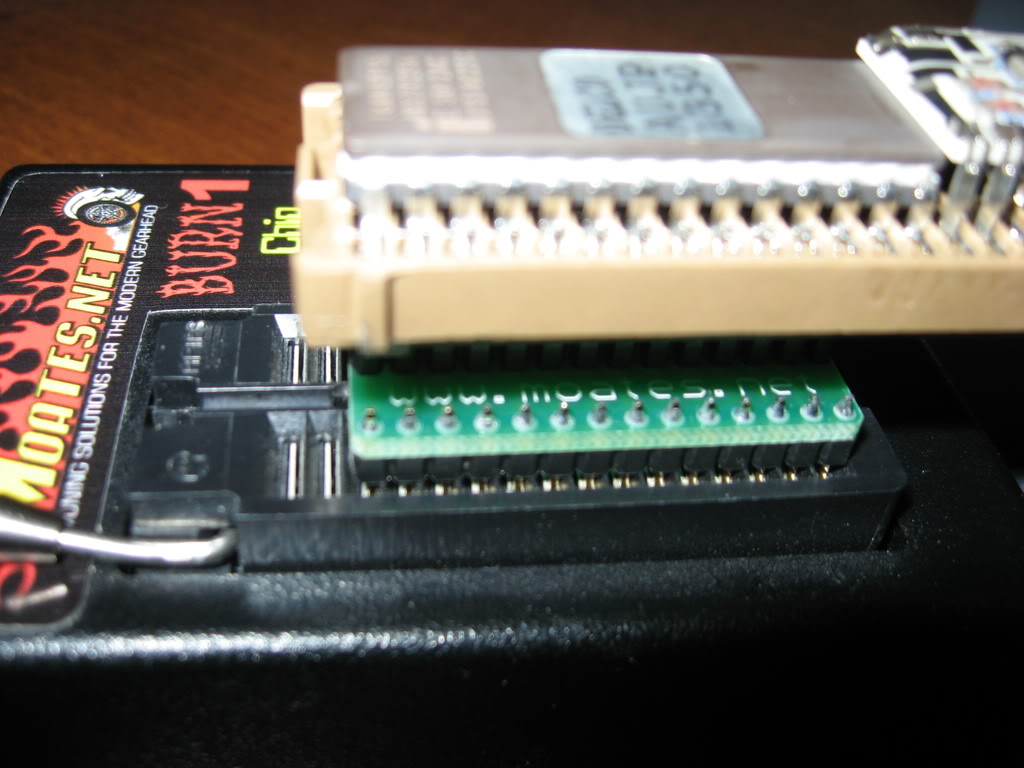

I'll attach some pics at the end.
I think I found a L98 350 Bin, but how do I know its the correct one? Its 32 KB, and the file name is AUJP 8D.bin (I assume thats correct according to RBob?). Its off of Moates File Exchange/Sharing Dictionary.
Are there any draw backs to using that bin, instead of the one from the actual car?
Moderator
iTrader: (1)
Joined: Mar 2002
Posts: 18,432
Likes: 234
From: Chasing Electrons
Car: check
Engine: check
Transmission: check
Re: Programed my first chip and...
If you have the original MEMCAL for the car it wil have the BCC on it. You can also get AUJP at Mike's site:
http://www.eecis.udel.edu/~davis/z28/index.html
The file aujp1615.bin has been read from the MEMCAL by Mike so I would trust it.
Note that AUJP is for '90 - '92 Camaro and Firebirds with the L98 and auto. So it should be the correct one for your vehicle.
RBob.
http://www.eecis.udel.edu/~davis/z28/index.html
The file aujp1615.bin has been read from the MEMCAL by Mike so I would trust it.
Note that AUJP is for '90 - '92 Camaro and Firebirds with the L98 and auto. So it should be the correct one for your vehicle.
RBob.
Joined: Mar 2006
Posts: 4,370
Likes: 19
Car: 1973 Datsun 240Z/ 1985 S-15 Jimmy
Engine: Turbo LX9/To be decided
Transmission: 5-speed/T-5
Axle/Gears: R200 3.90/7.5" 3.73
Re: Programed my first chip and...
You are sure you have the chip selection set to 27C256, when reading the stock EPROM?
Thread Starter
Joined: Oct 2005
Posts: 652
Likes: 0
From: Crestview, Florida
Car: 86 IROC-Z, 98 Z28
Engine: 370 LSx, LS1
Transmission: T56's
Axle/Gears: 3.73, 3.42
Re: Programed my first chip and...
It works  Thanks for that link RBob.
Yup. I might give Moates a call or email them sometime, but the aujp1615.bin is working fine for me. Hopefully I wont have this problem when I try and read the memcal in my 86 Iroc.
I'll probably have a allot more questions once I actually start to datalog/tune (I'll make sure to search before hand though), so thanks for all the help Six_Shooter, RBob, and convas.
Thanks for that link RBob.I'll probably have a allot more questions once I actually start to datalog/tune (I'll make sure to search before hand though), so thanks for all the help Six_Shooter, RBob, and convas.

Thread
Thread Starter
Forum
Replies
Last Post
KO1
Engine/Drivetrain/Suspension Parts for Sale
16
Oct 15, 2015 05:00 PM
