


signature


Thread Starter
Senior Member
Joined: Jun 2008
Posts: 1,298
Likes: 2
From: Norfolk VA
Car: 85 Camaro IROC
Engine: 5.7 TPI
Transmission: 700-R4
Axle/Gears: open rear, 3.42 gears
signature
just wondering if there was a way to automatically show my sig in a post without having to check the box every time
thanks
thanks


Re: signature
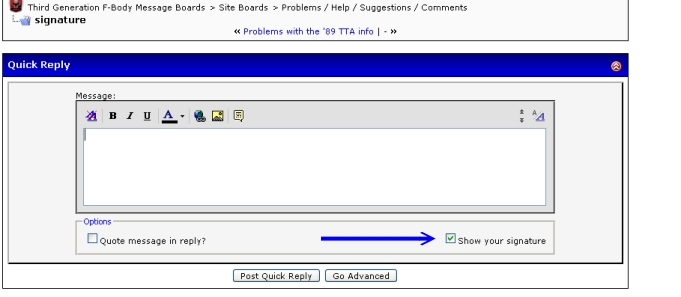
No. By default, if you have Show Signature set to Yes in your userCP, when you create a new thread, the "Show you Signature" will automatically be checked, which is an option below where you type your message. Your signature will then show.
However, if you reply to a thread, and if you want your signature to display, you will have to manually place check in the box for "Show your Signature" each time, which is the option below the where you type your message.
This is how the old vB 2.x that we used was tweaked, as it helps reduce redundant use of one's signatures, especially for those who may post in the same thread multiple times.
It's been this way for several years.
However, if you reply to a thread, and if you want your signature to display, you will have to manually place check in the box for "Show your Signature" each time, which is the option below the where you type your message.
This is how the old vB 2.x that we used was tweaked, as it helps reduce redundant use of one's signatures, especially for those who may post in the same thread multiple times.
It's been this way for several years.

Joined: Feb 2002
Posts: 3,462
Likes: 4
From: N. Illinois
Car: 92 GTA/ 00 TA
Engine: 383/350
Transmission: 700R4/T-56
Re: signature
Why is it that suddenly my signature posts all the time for me? My sig is a bit long so I only want it to show on posts that I originate.
Re: signature
Joined: Feb 2002
Posts: 3,462
Likes: 4
From: N. Illinois
Car: 92 GTA/ 00 TA
Engine: 383/350
Transmission: 700R4/T-56
Re: signature
Actually I always use the reply button in the post. For some reason "Post Quick Reply" doesn't work for me unless I hit the "Reply" first in the post. Consequently I never use "Post Quick Reply".
I guess i'll try to remember to uncheck the box.
This is strange.
I guess i'll try to remember to uncheck the box.
This is strange.
Re: signature
I have verified that if you use the full reply form, it does not show signature by default. I think it did at first, a week or two ago after we upgraded, but I fixed that.
Joined: Feb 2002
Posts: 3,462
Likes: 4
From: N. Illinois
Car: 92 GTA/ 00 TA
Engine: 383/350
Transmission: 700R4/T-56
Re: signature
To reply to this post I hit the "reply" button on your answer and currently the "show your signature" box is checked. I will uncheck when I submit but I did not hit quick reply. Am I using some old setup or something?
Trending Topics
Re: signature
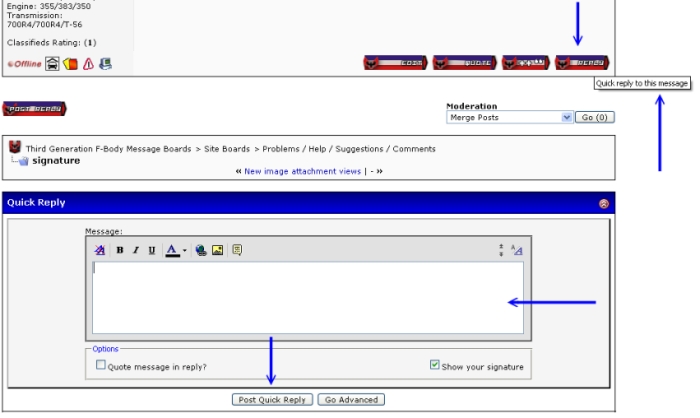
You click on the "Reply" button in one of the messages above, which looks like this

Notice when you hover over the "Reply" button, you see "Quick Reply to this message"
When you click on the "Reply" button in one of the messages, the input box then is activated.
Correct? That is the "Quick Reply". The full form reply would be the "Post Reply", which appears on the top left and bottom left of the thread.
BTW, this is the full reply form:
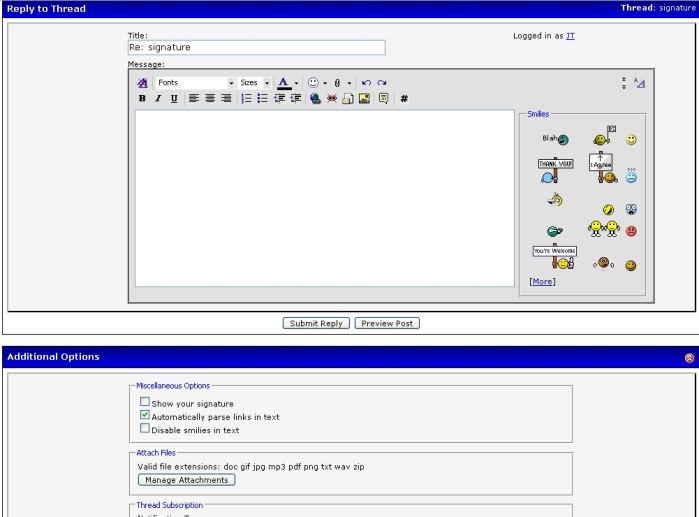
Notice the full reply form, by clicking on this icon
 does Not have Show Your Signature selected as default.
 Joined: Feb 2002
Posts: 3,462
Likes: 4
From: N. Illinois
Car: 92 GTA/ 00 TA
Engine: 383/350
Transmission: 700R4/T-56
Re: signature
Gotcha. Did something change? I've always used the bottom right reply button and never had to uncheck the sig box for quick reply.
Re: signature
Yes, we upgraded the vBulletin software on 1/29. Some of our customizations had to be redone and most were easily taken care of. However, this Quick Reply defaulting to Show Signature is an oddity, it's disabled in the template, but when the Quick Reply is activated, it's overwritten. I haven't checked into it deeply, but I have found other vB owners reporting the same issue and haven't seen a quick solution. It isn't working the same as it did in a previous version.
Joined: Feb 2002
Posts: 3,462
Likes: 4
From: N. Illinois
Car: 92 GTA/ 00 TA
Engine: 383/350
Transmission: 700R4/T-56
Re: signature
Okay. Hopefully you'll find an easy resolution.
In the meantime i'll try to change my posting habits or at least remember to unchck the box.
In the meantime i'll try to change my posting habits or at least remember to unchck the box.


Thread
Thread Starter
Forum
Replies
Last Post
soulbounder
Auto Detailing and Appearance
23
Nov 26, 2001 11:59 AM