


Code reading?


Thread Starter
Member
Joined: Jan 2001
Posts: 213
Likes: 0
From: Cincinnati, Ohio
Car: 87 GTA
Engine: Eaton Supercharged 350 TPI
Transmission: 700r4
Code reading?
I just got an 87 GTA and the Check engine light is on. Which pins do I connect to read the code? I read the article in tech about how to do it but it said that different years used different pins. Thanks for the help.

Supreme Member
iTrader: (2)
Joined: Jul 2001
Posts: 1,823
Likes: 1
From: San Antonio, TX
Car: 1988 IROC-Z
Engine: L98 (350 TPI)
Transmission: MD8 (700 R4) + 3.42 LS1 Rear
on a 87' GTA just do as the article describes. you'll be fine just short the A and B terminal and record the results.

Moderator


Joined: Jan 2000
Posts: 19,679
Likes: 316
HR,
First, you'll need to acquire a GM OBD I ECM Diagnostic Trouble Code Retrieval Tool (commonly known as a paper clip to TGO members).
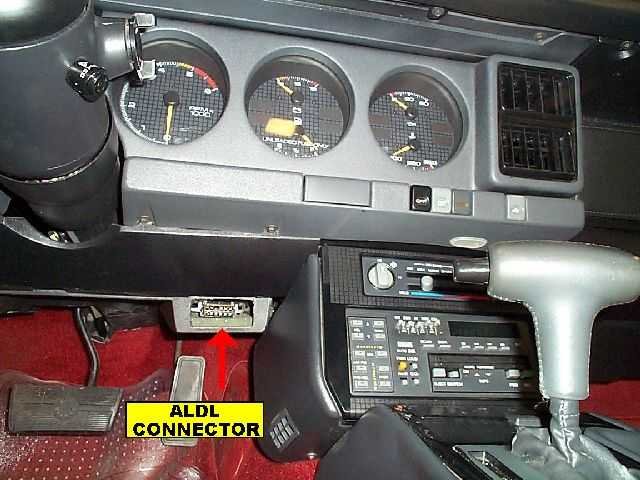
With the engine and ignition turned off, locate the ALDL connector under the dash, just to the right of the steering wheel in the driver's foot well area. There should be a small rectangular cover over the access hole in the lower dash trim.
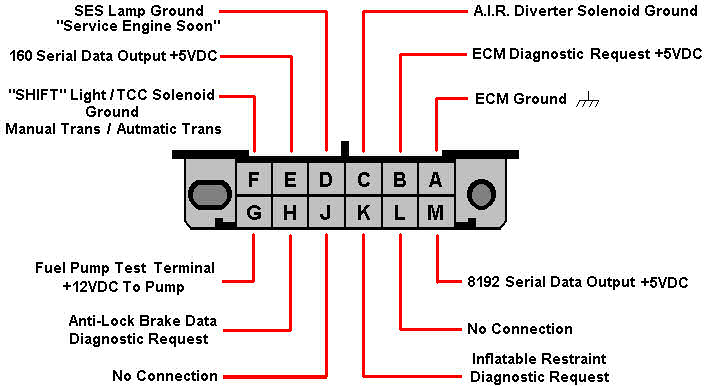
Insert a tool as described above (paper clip) into the 'A' and 'B' terminals on the ALDL connector:
WITHOUT STARTING the engine, turn the ignition to the "RUN" position. Watch the Malfunction Indicator Lamp (MIL) and it will begin to flash. This is also commonly called the "Service Engine Soon" or "SES" lamp. The first code will flash three times, and will usually be a code '12'. This is encoded by one flash of the lamp, a brief pause, then two successive flashes of the lamp. Each code will repeat three times, so you should see a "Code 12" flash three times. Any other error codes will follow in numerical order, and each code should flash three times. After all codes have been displayed three times, the "Code 12" will again flash three times, then all other codes will follow as described earlier. This cycle will continue until the jumper is removed or the ignition is turned off.
After you have made a note of all error codes, turn off the ignition and remove the jumper immediately. If you forget to remove the jumper and attempt to start the engine with it in place, you could damage the ECM. For this reason you should remove it immediately.
Once you have a note of all error codes, check this file for the decoding:
GM Error Codes.pdf.
You'll need Adobe Acrobat Reader to open/print the file.
------------------
Later,
Vader
------------------
If you want to beat the World, it might reach up and pull you down...
Adobe Acrobat Reader
First, you'll need to acquire a GM OBD I ECM Diagnostic Trouble Code Retrieval Tool (commonly known as a paper clip to TGO members).
With the engine and ignition turned off, locate the ALDL connector under the dash, just to the right of the steering wheel in the driver's foot well area. There should be a small rectangular cover over the access hole in the lower dash trim.
Insert a tool as described above (paper clip) into the 'A' and 'B' terminals on the ALDL connector:
WITHOUT STARTING the engine, turn the ignition to the "RUN" position. Watch the Malfunction Indicator Lamp (MIL) and it will begin to flash. This is also commonly called the "Service Engine Soon" or "SES" lamp. The first code will flash three times, and will usually be a code '12'. This is encoded by one flash of the lamp, a brief pause, then two successive flashes of the lamp. Each code will repeat three times, so you should see a "Code 12" flash three times. Any other error codes will follow in numerical order, and each code should flash three times. After all codes have been displayed three times, the "Code 12" will again flash three times, then all other codes will follow as described earlier. This cycle will continue until the jumper is removed or the ignition is turned off.
After you have made a note of all error codes, turn off the ignition and remove the jumper immediately. If you forget to remove the jumper and attempt to start the engine with it in place, you could damage the ECM. For this reason you should remove it immediately.
Once you have a note of all error codes, check this file for the decoding:
GM Error Codes.pdf.
You'll need Adobe Acrobat Reader to open/print the file.
------------------
Later,
Vader
------------------
If you want to beat the World, it might reach up and pull you down...
Adobe Acrobat Reader
Last edited by Vader; Mar 31, 2018 at 10:36 AM. Reason: Updated links

Thread
Thread Starter
Forum
Replies
Last Post
mdtoren
Tech / General Engine
0
Aug 16, 2015 05:45 PM