


not working


Thread Starter
Member
Joined: Apr 2011
Posts: 315
Likes: 2
not working
I am not getting a temp reading any ideas? got a green wire disconnected on the left side with the ac wires. Could this be the wire. I swear always something with a misplaced wire on this car. Maybe not.
1987 Firebird 5.0 tpi.

1987 Firebird 5.0 tpi.

Member
Joined: Sep 2011
Posts: 124
Likes: 0
From: Detroit, MI
Car: 1991 Pontiac Firebird
Engine: 305 TBI
Transmission: 700R4
Axle/Gears: 3.73, Detroit Trutrac, 10 bolt
Re: not working
Look for your Coolant temperature switch on the driver side head by the most forward exhaust port. It's screwed in there, and has one wire going to it. The wire might be faulty, or the sensor's shot.
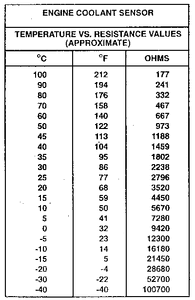
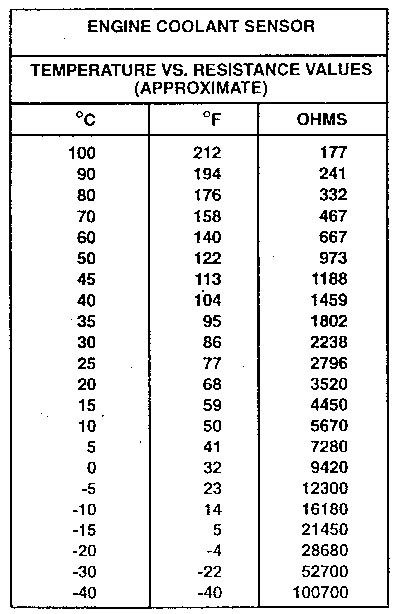
Unplug the wire on the sensor and drive around till your engine's hot. Grab your ohm meter and put the positive lead on the sensor's terminal, and the negative lead on the battery ground. If the resistance numbers are close to what you see here, and what you think the engine temperature is at (probably about 190F), then your sensor is good and the problem is the wire going to the sensor.
IIRC, 12+ goes into the sensor and grounds through the coolant temperature switch. Technically, if you touch the sensor wire to the block, the temp sensor should peg all the way hot.
EDIT: Yes, looks like that green wire might be it. Touch it to the block and look at your gauge to find out.
Correct me if I'm wrong.
Unplug the wire on the sensor and drive around till your engine's hot. Grab your ohm meter and put the positive lead on the sensor's terminal, and the negative lead on the battery ground. If the resistance numbers are close to what you see here, and what you think the engine temperature is at (probably about 190F), then your sensor is good and the problem is the wire going to the sensor.
IIRC, 12+ goes into the sensor and grounds through the coolant temperature switch. Technically, if you touch the sensor wire to the block, the temp sensor should peg all the way hot.
EDIT: Yes, looks like that green wire might be it. Touch it to the block and look at your gauge to find out.
Correct me if I'm wrong.


Re: not working
Trending Topics
Re: not working
Fan switch kicks the primary fan on. Nothing else
Gauge sender drives the gauge, nothing else
CTS in the front of the intake near the waterneck tells the ECM how hot the engine is
3 different parts, switch, sender, sensor, 3 different jobs
Gauge sender drives the gauge, nothing else
CTS in the front of the intake near the waterneck tells the ECM how hot the engine is
3 different parts, switch, sender, sensor, 3 different jobs

Supreme Member
Joined: Jun 2005
Posts: 1,800
Likes: 2
From: Bremerton, WA
Car: 1992 RS / 1989 RS
Engine: 3.1L MFI / Vortec 383 TBI
Transmission: T5 / LS-T56
Axle/Gears: 3.42 open / 3.73 Eaton posi
Thread Starter
Member
Joined: Apr 2011
Posts: 315
Likes: 2
Re: not working
Ok. So i found a green wire on the drivers side, i found the gauge sensor and plugged it back in and the guage works perfect. The primary fan is always running even with the sensor is broken. is this unusual?

Supreme Member
iTrader: (1)
Joined: Mar 2007
Posts: 3,525
Likes: 7
From: Arlington, Tx
Car: 91 Camaro RS
Engine: empty bay (for now)
Transmission: Built T-56
Axle/Gears: 3.42 stock posi disc
Re: not working
most likely the wire that supposed to run to the fan switch is just grounded out somewhere. its a common thing to happen. the fan switch breaks and stops working. and people just ground the wire making the fan run whenver the key is on, instead of replacing the switch.

Thread
Thread Starter
Forum
Replies
Last Post
Terrell351
Engine/Drivetrain/Suspension Parts for Sale
5
Jun 13, 2021 01:13 PM